Agent Harness: Wiring AI Agents into Engineering Workflows
When ChatGPT first took off, my workflow was: open a browser, paste a code snippet, wait for suggestions, then copy them back into the IDE by hand. That pattern is “chat-style assistance” — the AI talks, it does not act. What actually bends the productivity curve is the Agent: it does not just answer; it reads files, runs commands, edits code, and opens PRs. The catch is that dropping a large language model into an environment that can touch the filesystem is like handing a screwdriver to a child with no body awareness. It can fix things — or punch a hole through the motherboard.
The harness is the screwdriver’s “safety grip.” It is not the agent itself, but the middle layer between the agent and a real engineering environment: which tools the agent may call, what context it can see, how results are fed back, and how failures are contained. This post is about designing a dependable harness so agents join day-to-day development instead of becoming something you have to babysit.
The core problem: agents are capable — how do you let them touch code safely?
Agent capability boundaries are expanding fast. From early text completion, to GitHub Copilot’s inline suggestions, to systems like Cursor Composer and Pi Coding Agent that can edit across files, AI is shifting from “copilot” to “shift engineer.” Greater power means more concrete risk:
- Hallucination-driven damage: an LLM may confidently delete code that looks “unused,” when it is actually a fallback for older versions.
- Excessive privileges: if the agent has shell and git access, one bad judgment can
git push --forceto main. - Mismatched context: the agent never sees the CI failure logs, yet proposes fixes from stale local state.
- No audit trail: humans at least remember what they changed; an agent that ran twenty steps overnight leaves nobody sure what happened.
In short: agents need engineering capabilities, but the engineering environment must not trust agents unconditionally. The harness is the protocol layer for that trust exchange.
What a harness is: more than “tool calling”
First, what a harness is not. OpenAI Function Calling, Anthropic Tool Use, and community MCP (Model Context Protocol) all essentially define a schema so the model learns when to call external functions. They answer “how does the model request tools?”
A harness answers who executes, how the environment is prepared, how safety is enforced, and how results are fed back. An analogy:
- Function Calling is the “restaurant menu” — it tells the model what it can order.
- The harness is “kitchen + waiter + POS” — take the order, prep, cook, serve, handle returns.
In systems like Pi Coding Agent, the harness usually shows up as a local daemon (or a process embedded in an IDE plugin). It exposes a set of capability declarations to the agent; the agent chooses what to call for the current task. When a request arrives, the harness does four things:
- Discovery: tell the agent which tools exist in this environment. On a machine without Docker, do not expose
docker_build. - Context injection: pack the background the agent needs into the request. Do not dump the whole project tree; read relevant files, recent edits, and test-failure summaries on demand.
- Sandboxed execution: run commands or write files in a controlled environment — chroot, containers, or at least a whitelist check.
- Result feedback: return stdout, stderr, file diffs, and HTTP responses in a structured form, usually with metadata (exit code, duration, affected files).
Function Calling and MCP are protocols; the harness is a runtime. They work together: the agent expresses intent via the protocol; the harness makes it real at runtime.
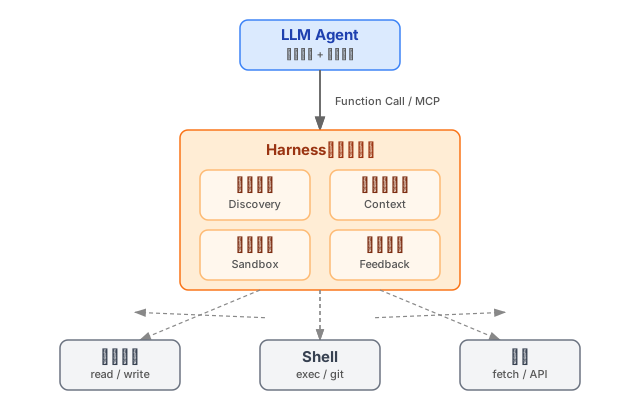
Figure: the harness sits in the middle — capabilities upward, controlled access to the filesystem, shell, and network downward.
A minimal harness: from file I/O to command execution
To make the idea concrete, imagine a minimal harness with only two tools: read_file and exec_command. The agent wants to change src/config.ts:
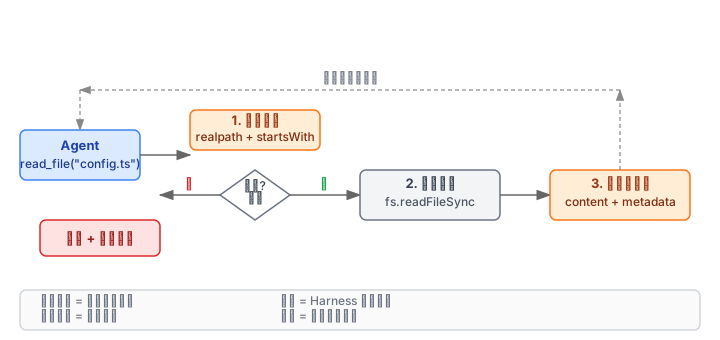
Agent: read_file("src/config.ts")
Harness: validate path is under project root → read → return

Agent: exec_command("git diff")
Harness: validate command is on the whitelist → run at repo root → capture stdout/stderr → return
A rough but usable harness skeleton (TypeScript pseudocode):
interface ToolRequest {
  name: 'read_file' | 'exec_command';
  args: Record<string, string>;
}

class MiniHarness {
  private rootDir: string;
  private allowedCommands = new Set(['git', 'npm', 'node', 'cat']);

  async dispatch(req: ToolRequest) {
    switch (req.name) {
      case 'read_file':
        return this.safeRead(req.args.path);
      case 'exec_command':
        return this.safeExec(req.args.cmd);
    }
  }

  private safeRead(rawPath: string) {
    const resolved = path.resolve(this.rootDir, rawPath);
    // Path escape check
    if (!resolved.startsWith(this.rootDir)) {
      throw new Error('Path escape detected');
    }
    return fs.readFileSync(resolved, 'utf-8');
  }

  private safeExec(rawCmd: string) {
    const [bin, ...args] = rawCmd.split(' ');
    if (!this.allowedCommands.has(bin)) {
      throw new Error('Command not allowed');
    }
    return execFileSync(bin, args, { cwd: this.rootDir, encoding: 'utf-8' });
  }
}
This skeleton runs, but production will hit pitfalls immediately:
- Path escape:
../etc/passwdis blocked bystartsWith, but symlinks can bypass it. Safer:realpathfirst, then compare. - Command injection: splitting on spaces is wrong. Spaces in
git log --format="%H %s"shatter arguments. Pass argv as an array (execFile, notexec). - Concurrent write races: two agent threads editing the same file — last write wins. Lock files or serialize writes.
- Uncontrolled side effects:
npm installmutatesnode_modules; without snapshots, rollback is a heavygit checkout ..
Context windows and designing the “tool protocol”
Every agent decision depends on the context the harness feeds it. Too much wastes tokens; too little and the agent guesses. One harness job is to be an information curator.
For fixing a bug, an ideal information flow looks like:
| Stage | Context the harness provides | Why not everything |
|---|---|---|
| Locate | Error stack + related paths | Not the whole-repo AST |
| Understand | Source of the failing function and its call chain | Not node_modules |
| Fix | Full target file + dependent interface signatures | Not every test file |
| Verify | Test command output (failed-case summary) | Not the full CI log |
Harnesses usually implement this layering with a few mechanisms:
1. Symbol index
Prebuild file → symbol → reference indexes (Tree-sitter or LSP). When the agent mentions UserService.authenticate, the harness finds definitions and call sites quickly instead of grepping the whole repo.
2. Prefer recent changes Files the agent just edited, open editor tabs, and recent git diffs are “hot” — inject them first.
3. Structured summaries Do not shove a 10 MB log at the agent. Preprocess: extract error lines, dedupe stacks, count failures, then emit a short structured summary:
{
  "test_suite": "auth.spec.ts",
  "failed_count": 3,
  "first_failure": "UserService.authenticate throws TypeError",
  "stack_top": "src/services/user.ts:42"
}
4. Dynamic context protocol
Agree on pull-on-demand: the agent gets a skeleton, notices a missing interface, then explicitly requests read_symbol("PaymentGateway.charge"). More controllable than dumping everything once.
The point: the harness understands the engineering structure better than the agent, so the harness should decide what is worth seeing — not let the agent rummage the repo.
Safety boundaries: least privilege and auditability
Path escape and command injection are only the start. Harness security is defense in depth:
1. Filesystem sandbox
Lightweight: chroot or bind-mount the agent into the project directory. More modern: run the harness in a container (e.g. Docker rootless) with read-only mounts. Default deny: writing a file requires a whitelist pass.
2. Command whitelist and argument checks
Validate more than the binary name — validate argument patterns. Allow git diff, not git push; allow npm test, not npm publish. Regex or templates work:
const rules = [
  { cmd: 'git', args: /^diff\s/ },
  { cmd: 'npm', args: /^run\s(test|lint|build)$/ },
];
3. Network isolation Agents should not freely hit the public internet. Some tasks need it (npm package versions). Maintain an allowlist (registry.npmjs.org, pypi.org); block the rest by default. If search is needed, the harness proxies and returns redacted results.
4. Operation audit Every tool call should leave structured logs, at least:
{
  "timestamp": "2025-07-15T09:23:17Z",
  "agent_id": "pi-session-42",
  "tool": "write_file",
  "args": { "path": "src/config.ts" },
  "diff_hash": "sha256:a1b2c3...",
  "exit_code": 0
}
With an audit log you can answer “what did the agent change?” Further: require human confirmation before sensitive ops (git push, rm -rf), keeping autonomy at the “suggest” layer rather than “execute.”
5. Rollback If the agent breaks the tree, stash or branch before each write. After a multi-step failure, roll back to the start in one shot instead of manually checking out twenty files.
Wrap-up
Wiring AI agents into engineering workflows is not only about better models — you need a reliable harness as the safety grip. Core points:
- The harness is a runtime, not a protocol. Function Calling / MCP define how agents express intent; the harness executes safely in the real environment and feeds results back.
- Context should be curated by the harness. Agents should not rummage the repo; the harness injects symbols, summaries, and dynamic data by stage, balancing token cost and precision.
- Safety is default-deny plus auditability. Sandboxes, allowlists, and network isolation are baseline; operation logs and rollback are what make people willing to put agents near CI.
If you are building an IDE plugin, a CI agent, or an internal DevOps bot, harness design quality decides whether you can cross the gap from “AI assistance” to “AI automation.”