Building Agents with LangChain in Practice
This article starts from the LangChain basics, beginning with a simple agent and working up to the concepts you need to build a production-grade agent system.
A traditional chatbot can only chat: its intelligence shows up as knowledge output, but it cannot make decisions on its own or call tools. Although the big AI vendors later introduced the idea of toolsets, their tool capabilities are very limited for the specifics of many businesses. When you build an agent system, the business core is not the LLM itself but the orchestration layer. LangChain is a framework for exactly that orchestration layer, and it makes agent systems much easier to implement.
1. What Is a LangChain Agent
1. Core Components of an Agent
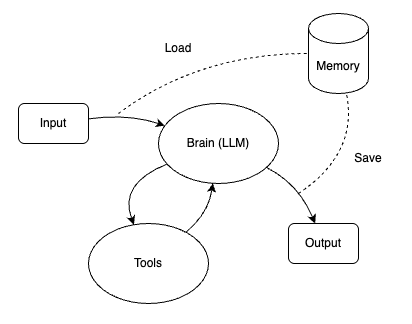
In LangChain, and in AI systems more broadly, an agent is not "a model that can chat". It is a system that can understand a goal, make decisions, and take action. A practical agent can usually be abstracted into three core components:
Agent ≈ Brain + Hands + Memory
Brain: Thinking and Deciding
The brain is the large language model (LLM). It differs significantly from a chat application: its job is not to answer questions and output knowledge, but to:
- Understand user intent
- Break the task into steps
- Decide whether to call a tool
- Decide which tool to call, and how to call it (with what arguments)
Hands: Letting the Agent "Do Things"
The hands are Tools. A tool is essentially a capability provided outside the model, with a clear function, that the model can invoke.
Common tools include:
- Search engines (looking things up)
- Calculation (numerical computation, statistics, and so on)
- API calls (looking up orders, sending email, and so on)
- Database / vector retrieval (RAG)
Generally speaking, the ceiling of an agent's capability is often set not by the model but by its tools.
Memory: Giving the Agent "Context Awareness"
Once started, an agent—like a chatbot—accumulates a large amount of context as the conversation continues. If the agent cannot load previously saved context each time it starts, it begins from zero, and complex business processes cannot resume after an interruption. So it is essential for an agent to be able to save context and remember.
An agent's memory typically includes:
- Short-term memory: the current conversation context, usually kept in memory.
- State information: intermediate results and completed steps.
- Long-term memory: user preferences and historical behavior.
Memory here is not the same as stuffing the entire conversation context into the prompt. Real memory selectively remembers the important information.
These three components cooperate through a core loop, shown below.
2. The Basic Execution Flow of an Agent in LangChain
In LangChain, an agent is not an object you call directly. What actually drives the agent is the AgentExecutor.
Before looking at AgentExecutor, consider an example that does not use a LangChain agent but instead calls the LLM manually to perform a tool call, as shown below.
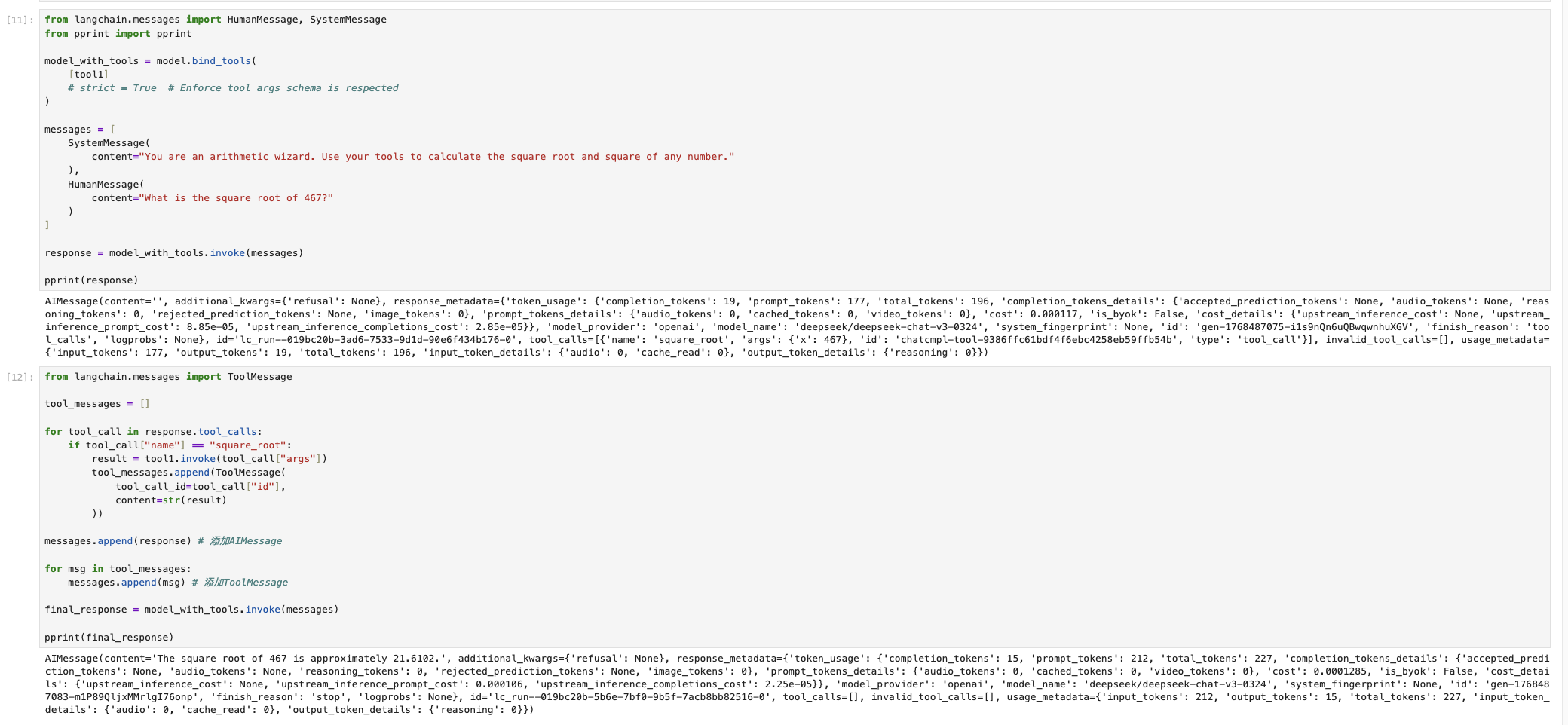
As you can see, interacting with the LLM to use a tool takes a lot of tedious work (appending the tool call ID and the manually obtained result to the context messages) before the model can use the tool's output. LangChain's AgentExecutor is a high-level wrapper that not only solves this, but also handles other errors and exceptions.
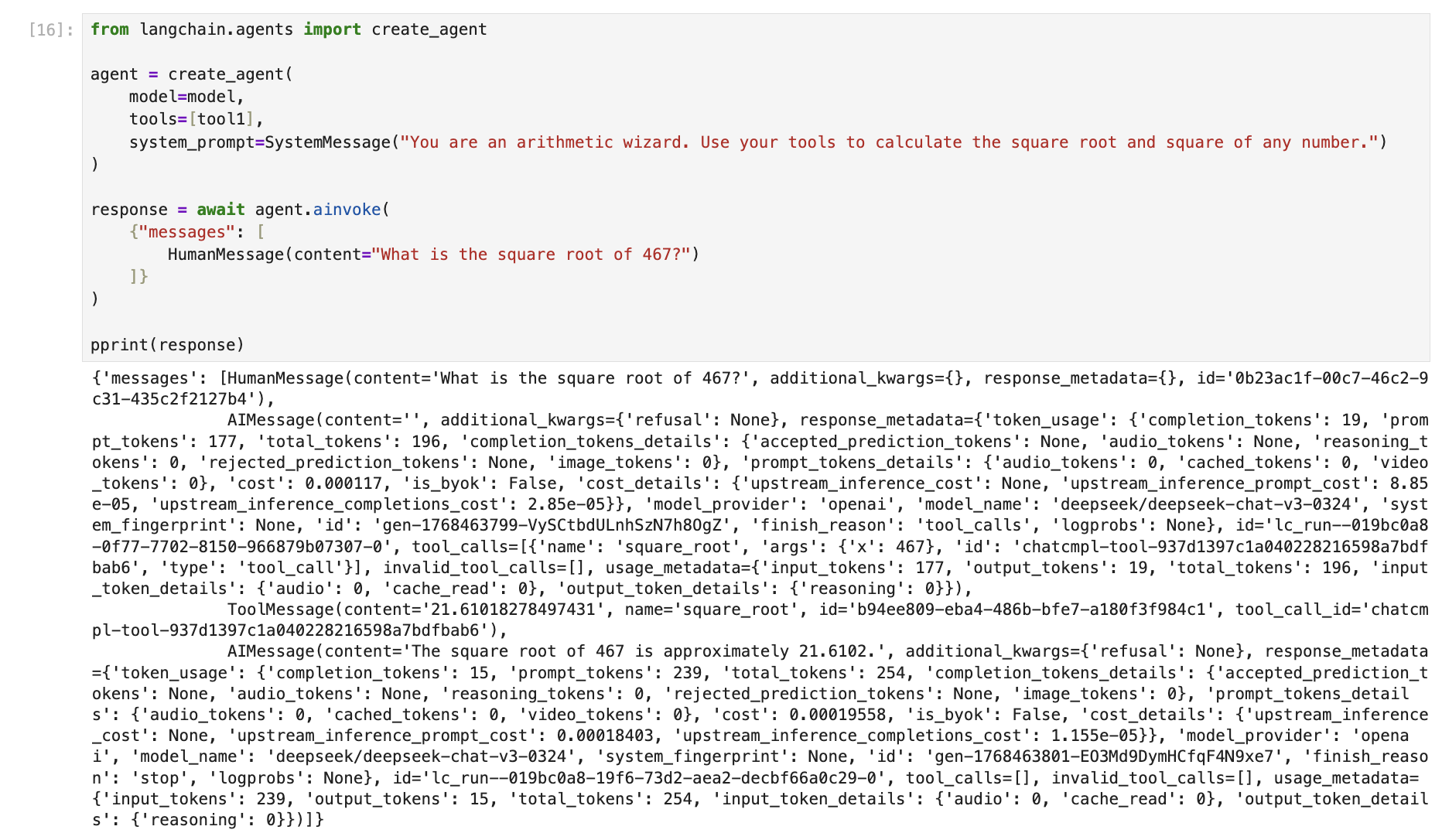
As shown above, all the tedious work under the agent is handled automatically; we only need to care about the flow and the result.
First, here are the four main responsibilities of AgentExecutor:
1. Driving the Agent's Reasoning Loop
The core of an agent is not a single model call but a loop:
- Pass the current input + context to the agent (LLM)
- Parse the model output and decide whether the next step is to:
- Give the final answer directly
- Or call a tool
- If a tool call is needed:
- Run the tool
- Get the result
- Feed the result back to the agent
- Enter the next round of reasoning
This loop is not run by the model; it is run by AgentExecutor.
2. Orchestrating and Executing Tool Calls
AgentExecutor is the heart of the agent. Its responsibilities are:
- Match the model output to the corresponding Tool
- Validate the arguments
- Run the tool function
- Capture the tool function's result or exception
- Wrap the result
So AgentExecutor automatically performs the steps from the Jupyter demo above, and does so in a more standardized and elegant way.
3. Managing Context and Intermediate State
Besides wrapping the tool-calling steps, AgentExecutor also maintains, throughout the session, the current conversation history, intermediate reasoning results, Memory reads and writes, and a record of executed steps.
This information determines what the LLM can see and whether the agent falls into an infinite loop, and it is also useful for debugging and observability.
4. Runtime Control and Safeguards
In real systems, AgentExecutor also has some fallback responsibilities that act as controls and safeguards.
These include:
- Maximum iterations (to prevent infinite loops)
- Timeout control
- Error handling and retries
- Logging
2. From 0 to 1: Building a Basic Agent
The sections above explained the basic concepts of LangChain agents and the structure of their core.
The approach to building such an agent is then clear: follow the agent's core components so that it becomes an entity that can think and use tools, in three steps.
1. Choose a Base Model (LLM Model)
Model choice is crucial for an agent. There are generally two types:
- Chat models
- Instruct models
They differ a lot. Chat models are optimized for multi-turn conversation and are good at understanding context, roles, and conversation state. Instruct models are optimized for following instructions and are good at getting a task right, reliably, in one shot.
For example, deepseek-chat is a chat model, while mistral-small-24b-instruct is an instruct model.
The capabilities that matter most for an agent are instruction following and stable Tool Calling.
2. Give the Agent Tools
A Tool is essentially a function with a description. Each Tool has a corresponding Tool Schema that describes the function, and it directly affects the agent's behavior.
Tool design takes care. If tools are poorly designed, the agent will misuse them (the Tool Schema should describe each function clearly, and when there are several tools, their responsibilities should be clearly separated).
From these three steps, we can see that a working agent needs:
- The ability to think
- Tools
- The ability to understand context
The figure below shows how a Tool is defined.

Once defined, tool1 can be referenced directly by a model or agent.
3. Short-Term Memory
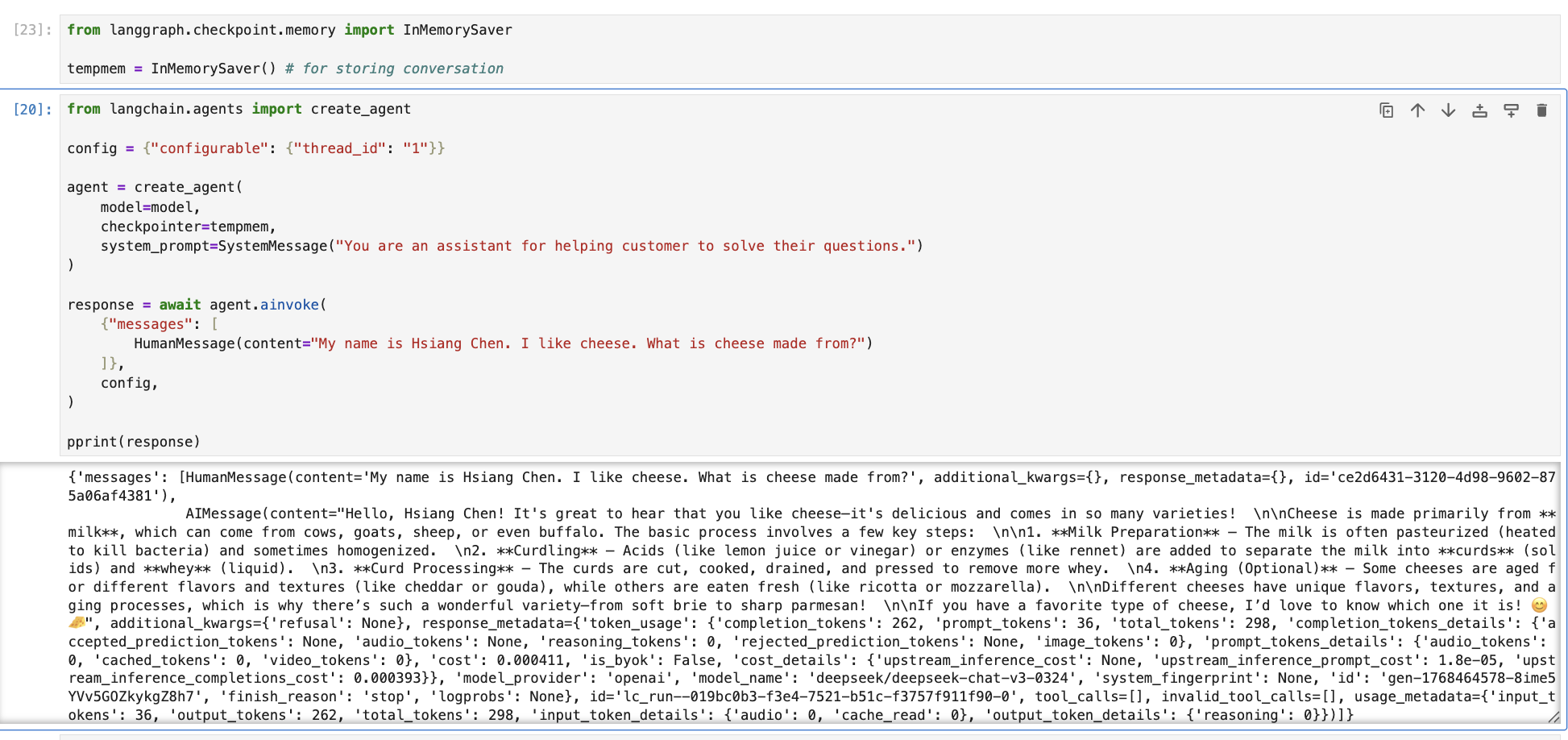
Short-term memory lets an agent be interrupted and later resume without losing earlier results and information. LLMs are stateless: if you do not provide the old chat history, the model does not know it.
The memory here is short-term memory stored in RAM and not persisted to disk; its purpose is to feed the LLM. Persisted storage belongs to a different category: vector databases.
The figure below shows how to set up and use a short-term conversation store.
3. From a "Single Agent" to an "Intelligent System"
Now let's move from a single agent to a system-level perspective.
1. Long-Running Context and State
Context here involves distinguishing two concepts: Context and Prompt.
What Is a Prompt
A prompt is the input to a single model call; its lifetime is limited to that one call.
What Is Context
Context is the set of information an agent shares across multiple steps and rounds of decisions.
Context can include the conversation history with the model, intermediate reasoning results, results of external tool calls, actions taken, the current task state, and so on.
LangChain also supports defining a special kind of context data. The example below shows how to set Context on an agent.
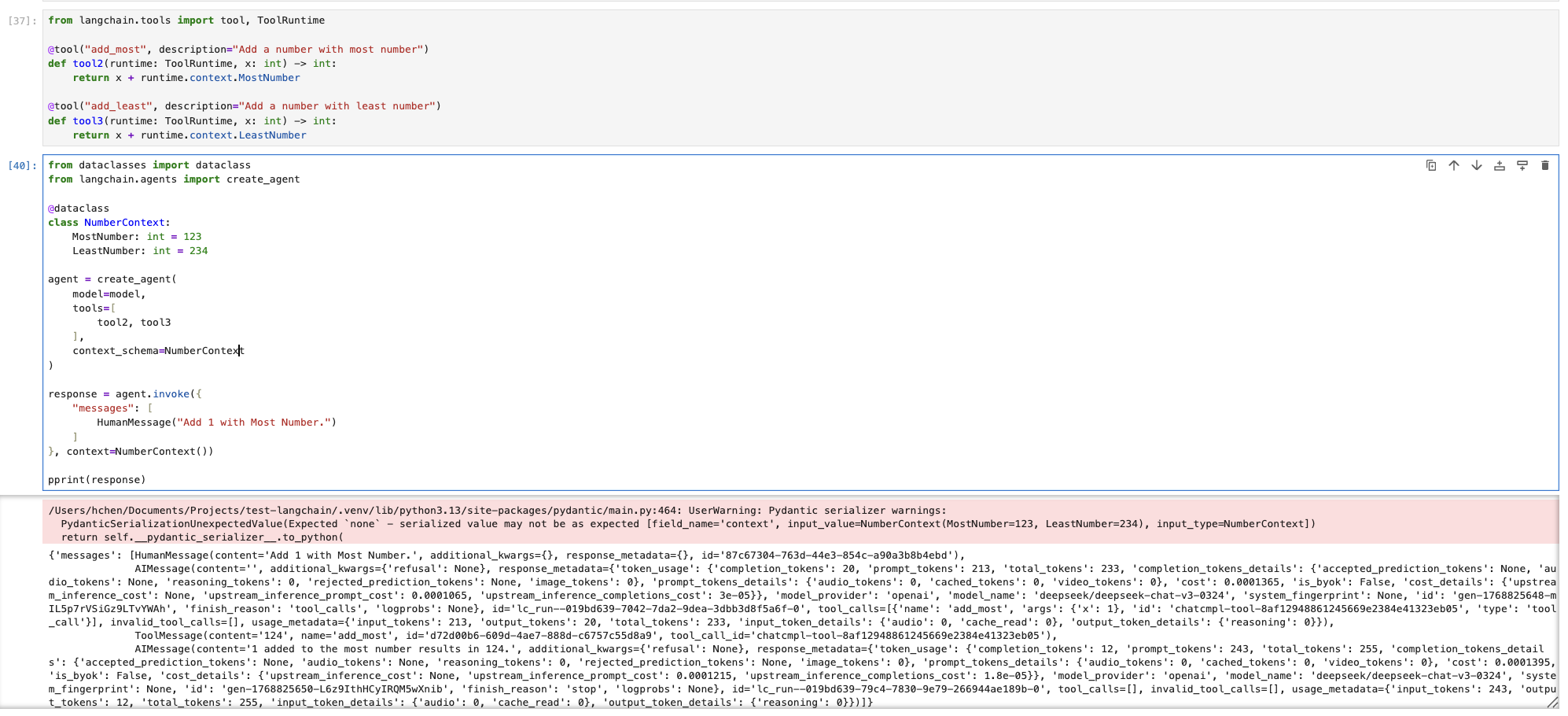
An agent's runtime state represents its current phase and is used to decide the next action. With state, you can represent a continuously running system (much like a state machine).
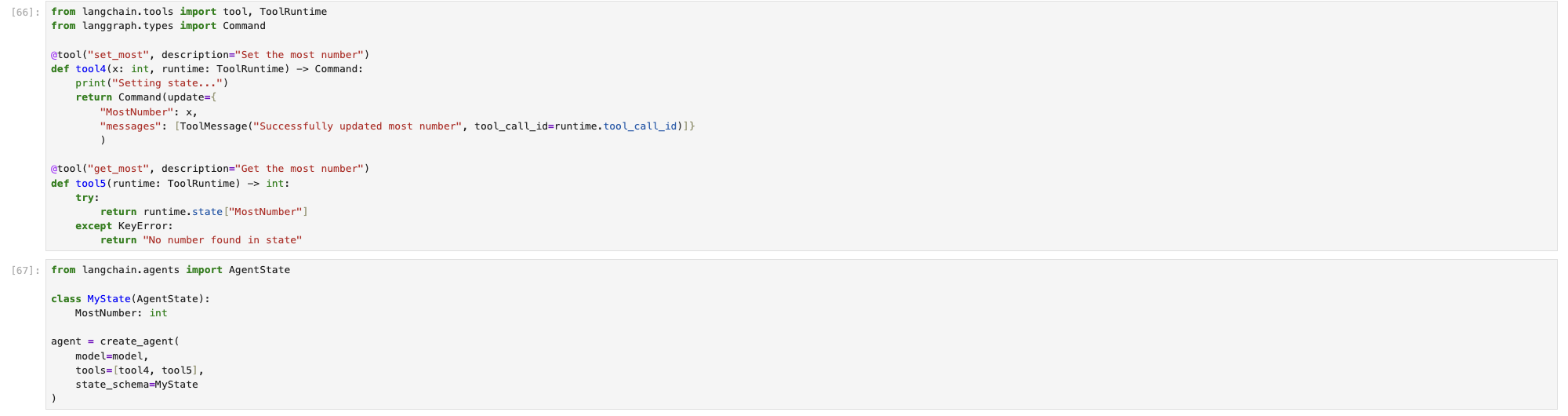
So how do you define an agent's state in LangChain?
LangChain supports defining a special agent state by creating an agent with a state schema (similar to Context), as shown below.
Both invocation styles achieve the same effect.
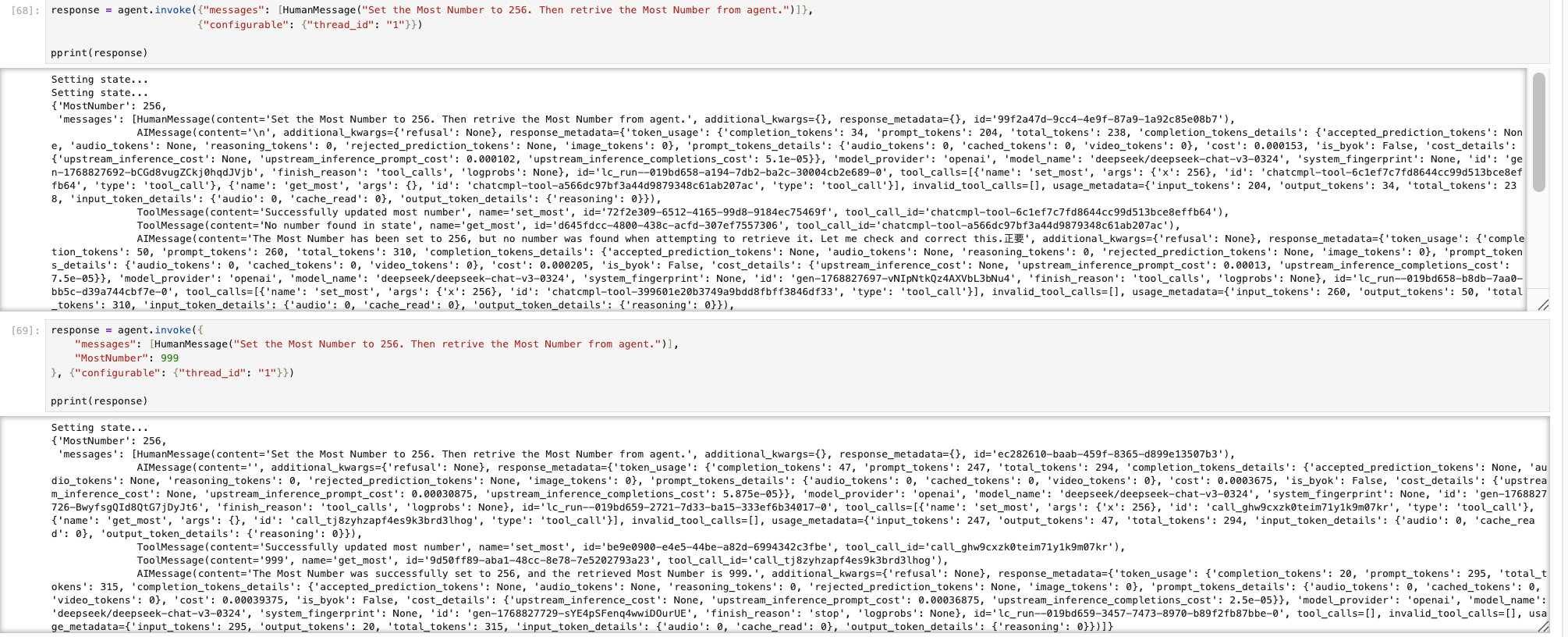
Note that the LLM is a consumer of State, not its owner.
2. Introducing the Model Context Protocol (MCP)
As agents evolve from "one model + a few tools" to "multiple models + many tools + long-running operation", one question becomes unavoidable:
How should Context be organized, passed, and understood?
That is exactly the core problem the Model Context Protocol (MCP) sets out to solve.
Engineering pain points of agent systems, and how MCP addresses them:
1. Data Silos and Fragmented "Context"
- Pain point: AI often operates in an "information vacuum". To give it project background, you have to copy and paste documents by hand, or put up with the complex setup of RAG (retrieval-augmented generation).
- Solution: MCP lets AI pull the most relevant context from local files, databases, or third-party APIs in real time and on demand, without repeatedly uploading data.
2. Very High Integration Maintenance Costs
- Pain point: APIs change often. If GitHub updates its API, every AI tool you integrated with GitHub might break.
- Solution: Developers only need to maintain one MCP Server. Once that server is updated, every MCP-capable AI client (such as Claude Desktop or the Cursor editor) can use the updated functionality directly.
3. Messy Security and Permission Control
- Pain point: Authorizing AI usually means handing an API key to a third-party app, which is a security risk.
- Solution: MCP supports locally running servers. Your sensitive data (local code, financial reports, and so on) does not need to be uploaded to the cloud for processing; the MCP Server can run locally and give the model only the necessary summary information, preserving data ownership.
4. No Unified Tool Calling Standard
- Pain point: Function Calling formats differ slightly between models, so switching models often means rewriting tool logic.
- Solution: MCP defines unified interaction standards for Resources, Prompts (prompt templates), and Tools, making "model-driven tools" as simple and universal as calling a function.
MCP is a revolution about "decoupling": it separates "what the model can do" from "how data is obtained".
Using an MCP server in LangChain is very simple, as shown below.
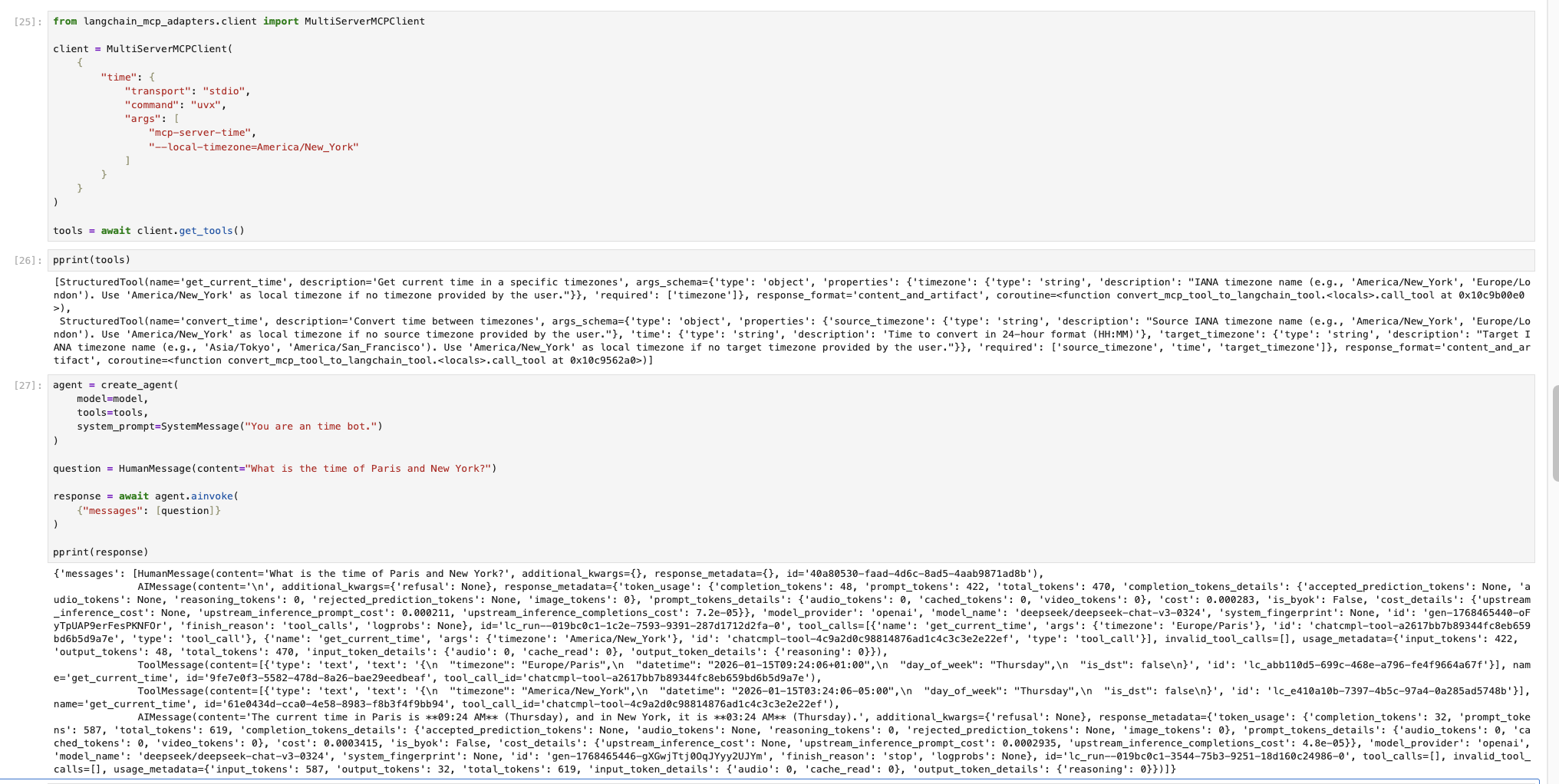
The example first starts a time-lookup MCP service, then has the agent fetch its tools and use them.
For how to design and build an MCP service, see an MCP getting-started tutorial; the MCP protocol is documented here.
3. Multi-Agent Systems
Why isn't a single agent enough?
In the demo stage, one agent often looks "smart enough", but once it hits real-world scenarios, the problems of a single agent surface quickly.
1. Problems with a Single Agent
These problems fall into several categories:
-
Complex tasks make responsibilities spiral out of control
Understanding requirements, breaking down tasks, calling tools, and so on make the context grow longer and longer, so the reasoning path—and the result—becomes increasingly unpredictable.
-
Reasoning, execution, and verification are mixed together
With these three mixed, any error is very hard to pin down—the equivalent of a service with no clear responsibility boundaries in software engineering.
-
Very poor scalability and maintainability
For example, adding review capability or human intervention to the system may, with a single agent, mean rewriting the prompt and retesting every path, which is very risky.
-
Security and cost concerns
A single agent is a single service and may be granted high privileges it does not actually need. Those privileges are hard to narrow down, which puts pressure on both system security and cost.
2. Designing Multiple Agents
The core idea of multi-agent design: split responsibilities instead of piling on capabilities.
Common multi-agent collaboration patterns include:
-
Planner / Executor pattern
The Planner Agent understands the goal, breaks down the task, and produces an execution plan; the Executor Agent calls tools according to the plan and focuses on execution.
-
Reviewer / Worker pattern
The Reviewer Agent reviews task results, finds problems, provides revision suggestions, and decides whether to approve; the Worker Agent does the main work and produces the draft or result.
-
Manager / Sub-agent pattern
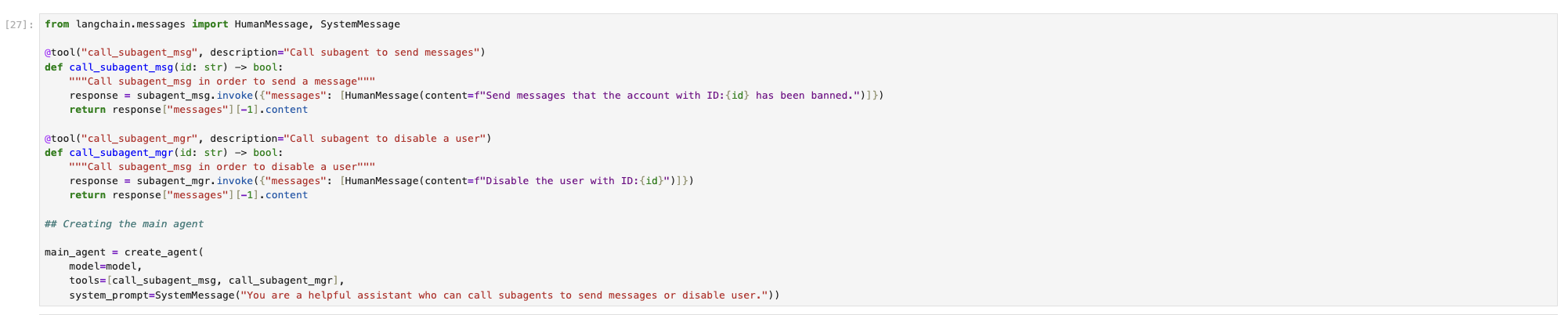
The Manager Agent analyzes the task type, decides which sub-agents to call, and aggregates the final result. Each Sub-agent handles one submodule or subdomain, with its own independent toolset and context.
Below is an example of the Manager / Sub-agent pattern.
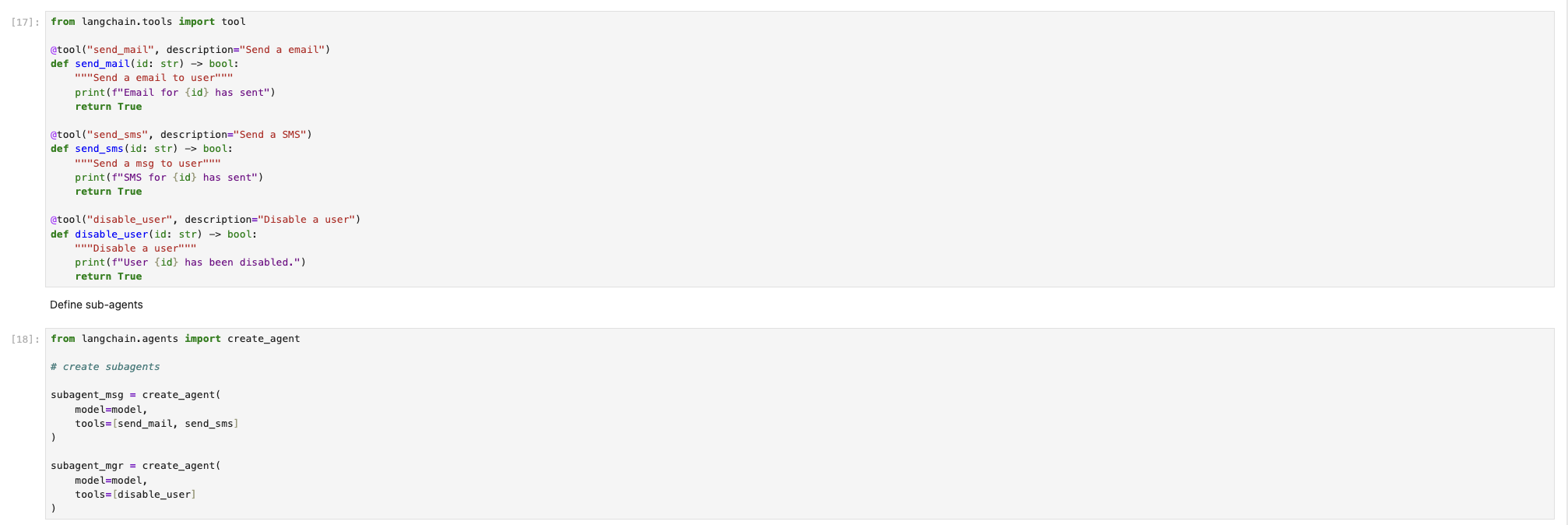
The example is an agent that supervises game players. When it detects a cheating player, it automatically sends a notification and bans the player in the system.
First, define the tool functions (all mock operations here) and the sub-agents (one for sending notifications and one for banning users).
Then define the Manager Agent (main_agent here).
Invoke the Manager Agent with the operation to perform; the result is shown below.
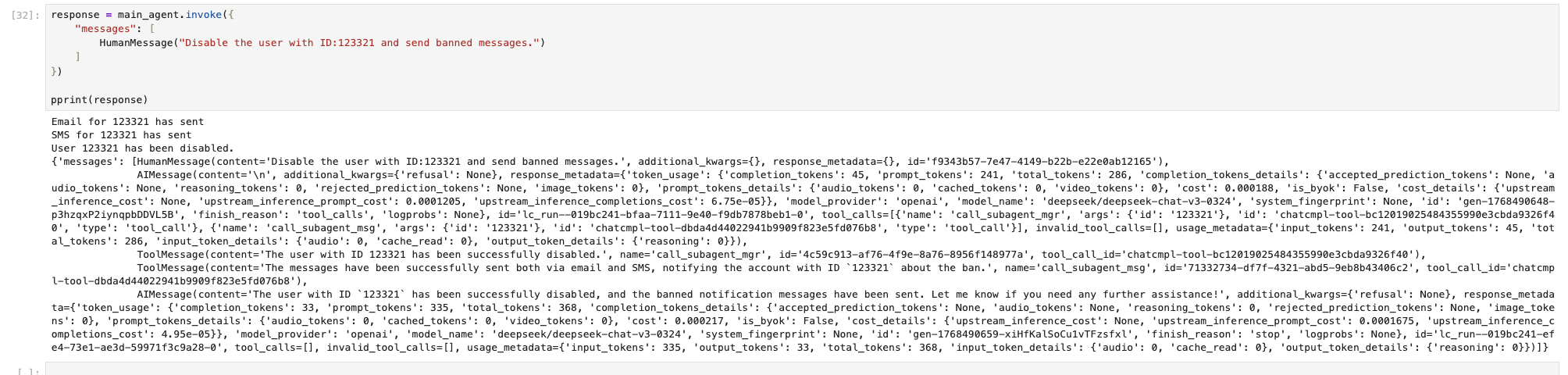
In this pattern, the agent calls and their effects match expectations.
4. Toward Production: Building a Deployable Agent
Building an agent system is not just about getting it to run; what matters more is that it runs stably over the long term. This section covers what to pay attention to in production.
1. Introducing Agent Middleware
A traditional computer consists of a CPU, memory, and peripherals, and the operating system ties them together. By analogy, the LLM is the CPU, different agents are different applications, and Agent Middleware is the operating system of the agent system: it is the component that manages the different LLMs and agents. Without middleware, an agent system could only be managed by hand, which is tedious, hard to reuse, limited in extensibility, and error-prone. That is why Agent Middleware is the operating system of an agent system.
Agent Middleware usually falls into these categories:
-
Runtime management
Addresses how agent steps advance and how to recover from failures.
-
Context and memory
Decides which information enters the context so the agent does not "forget", and how to compress context when it gets too long.
-
Tools and capabilities
Focuses on how tools are called safely and how to handle tool call failures.
-
Flow and collaboration
Concerns how multi-step tasks are broken down and how multiple agents collaborate.
-
Safety and governance
Covers agent security governance: agents must not act recklessly in the system, including intercepting risky operations to meet enterprise compliance requirements.
-
Observability and operations
Used for monitoring and debugging, making it easier to reproduce and fix errors and to track day-to-day metrics.
Here is a table comparing them with a computer for reference:
| Middleware Category | OS Analogy | Core Responsibility |
|---|---|---|
| Runtime & Execution | Kernel | Execution and lifecycle |
| Context & Memory | Memory Manager | State and memory |
| Tool & Capability | Syscall | Capability invocation |
| Control Flow | Scheduler | Flow and collaboration |
| Safety & Governance | Permission System | Security and compliance |
| Observability & Ops | Debug / Monitor | Debugging and operations |
2. Long Conversations and Context Compression
Long conversations and context compression are a very practical engineering problem that shows up as the number of turns grows. Overly long conversations consume a lot of tokens and drive up system cost. One approach is to forget useless information, such as intermediate tool-call results; a more common approach is to summarize the conversation history. The system then automatically condenses the history into a brief summary, so the agent does not lose its memory.
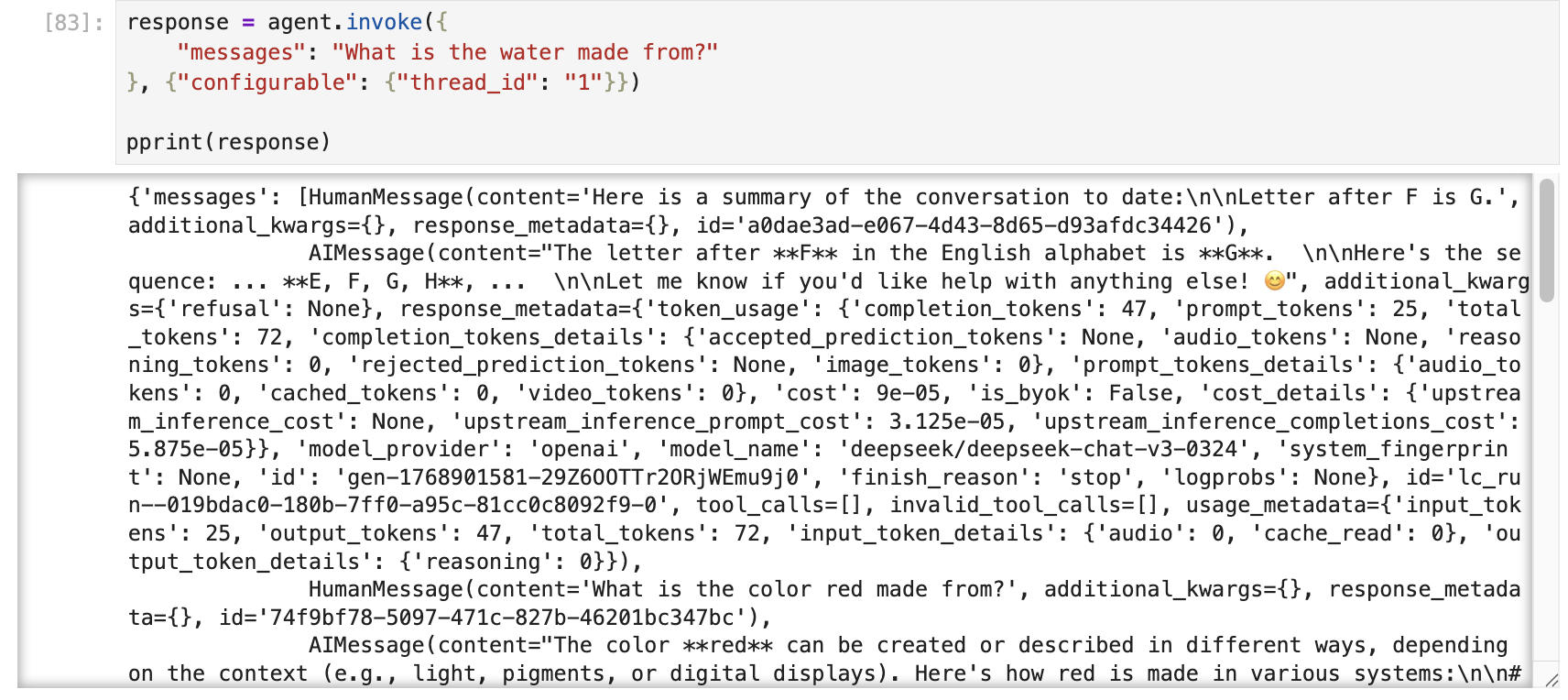
The example below shows how to use SummarizationMiddleware in LangChain to compress the context of a long conversation.
First, define an agent that supports short-term memory and uses the SummarizationMiddleware, then start asking questions.
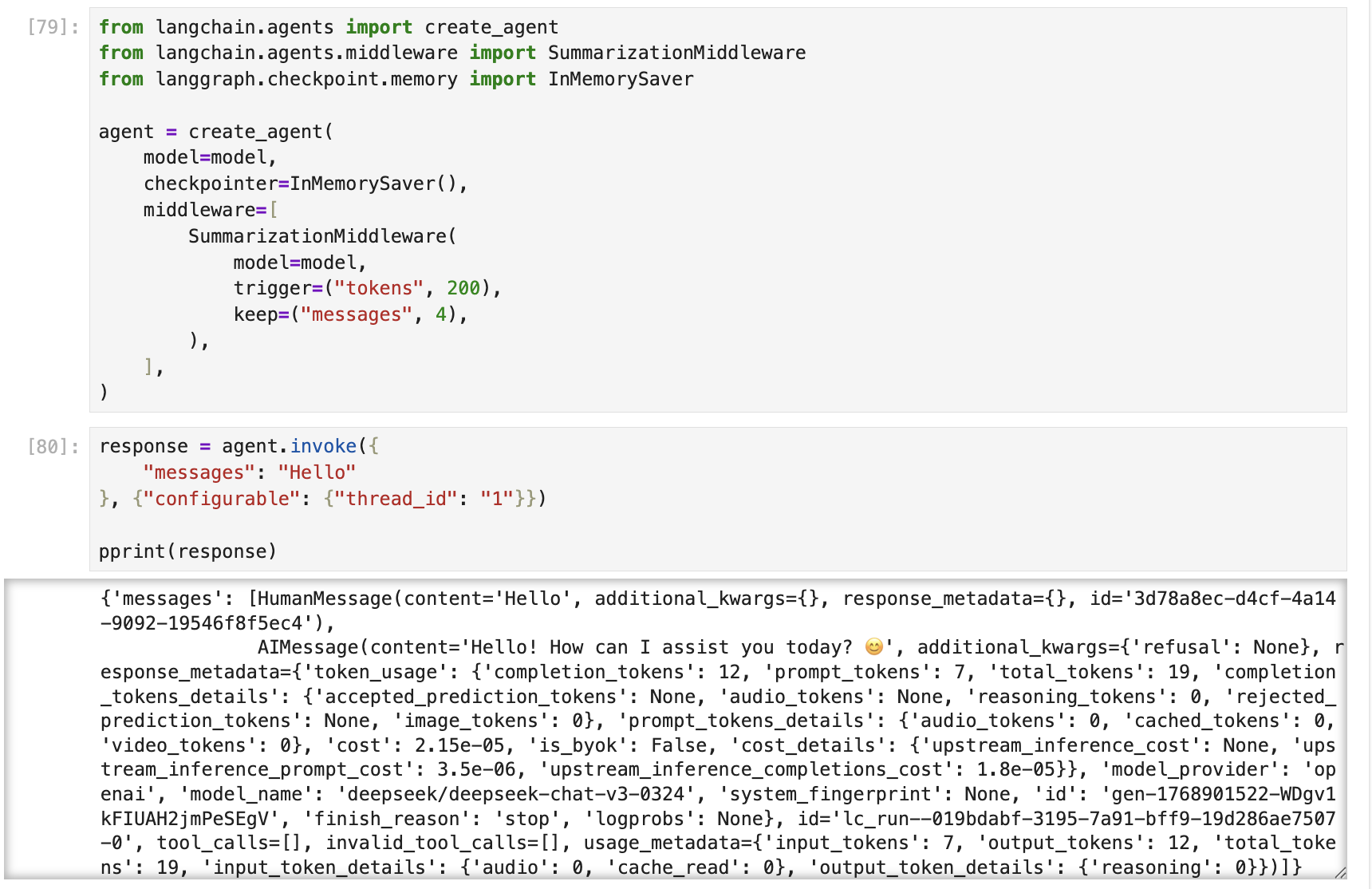
After several rounds of Q&A, once the configured threshold is reached, the content in messages is compressed into a summary.
3. Human-In-the-Loop (HITL)
In production you will run into high-risk decisions and operations that require human intervention. This is also how agent systems stay safe and compliant.
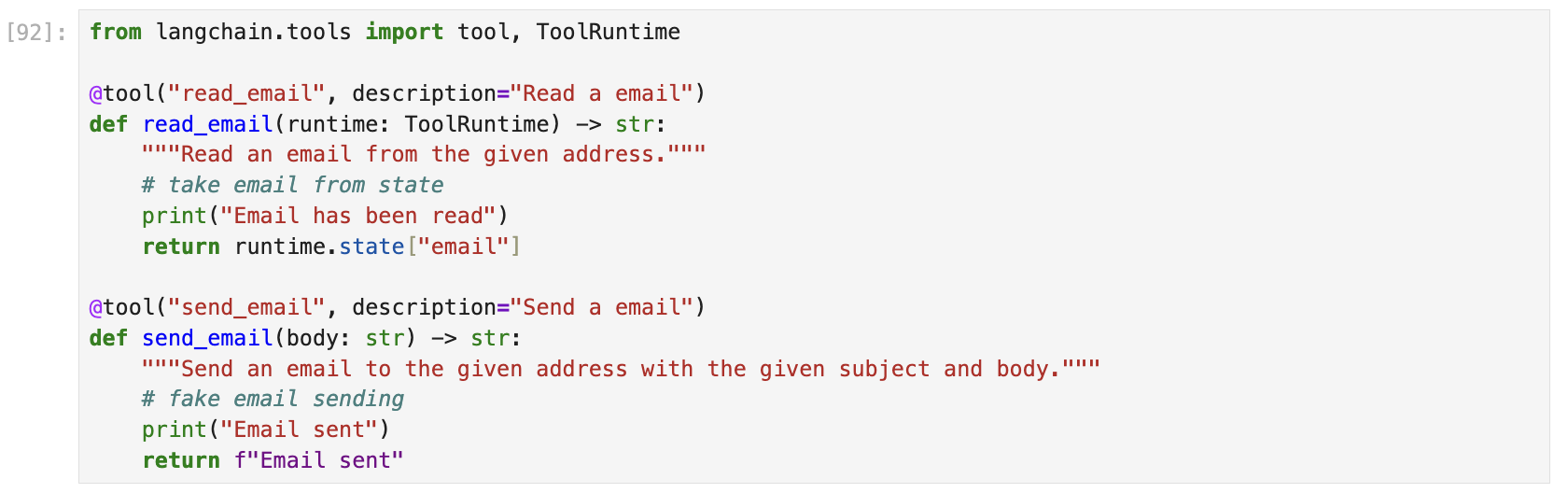
Here is an example: the agent reads emails for the user, then asks the user to confirm before deciding to send an email.
First, define two tool functions, read_email and send_email, which are the operations this agent performs.
Next, define an agent that supports HITL and send it a request.
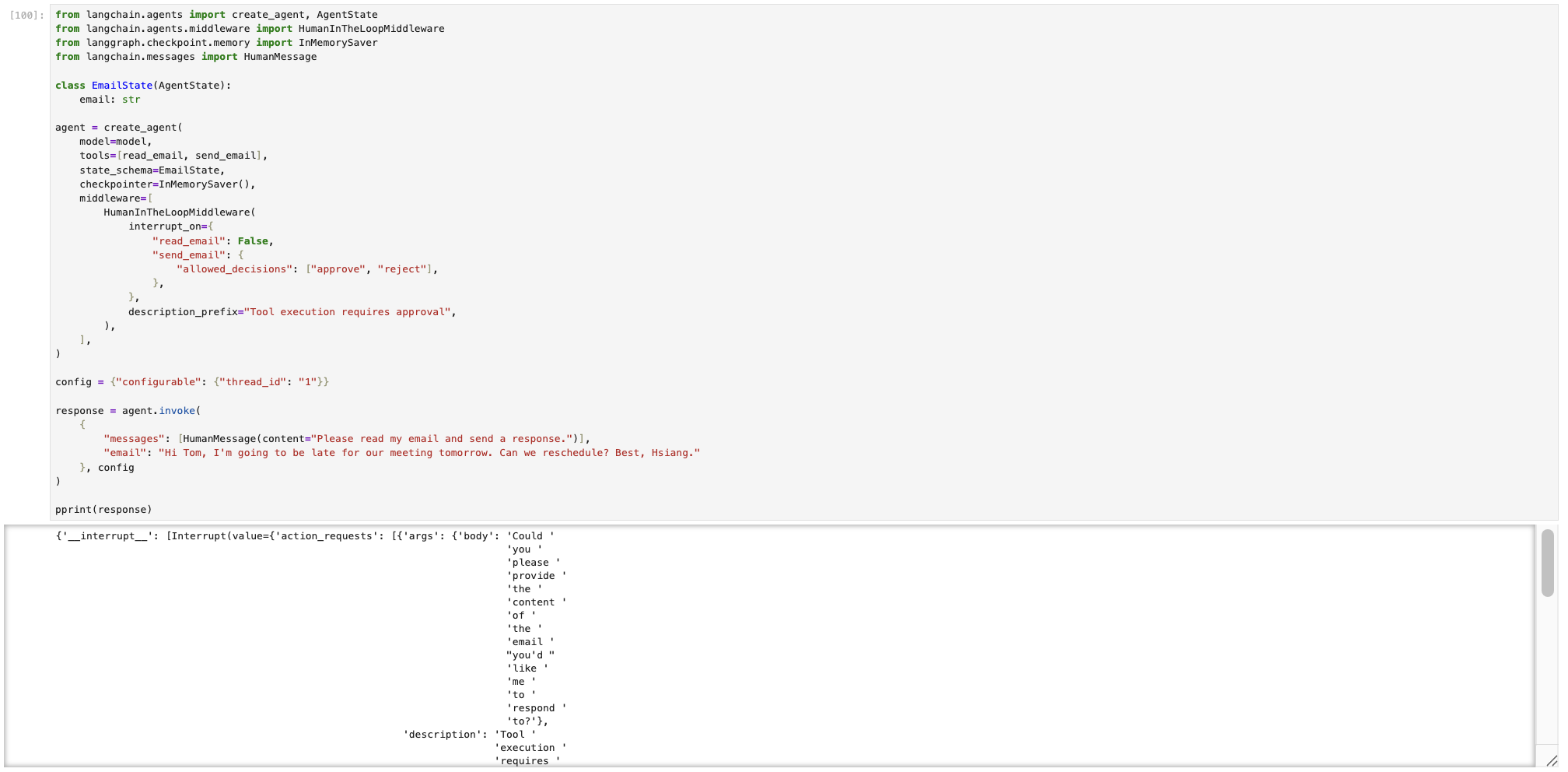
Looking at the output, there is an extra __interrupt__ field in the response with a detailed description.
You can then submit one of two decisions to the agent: approve (approve) or reject (reject).
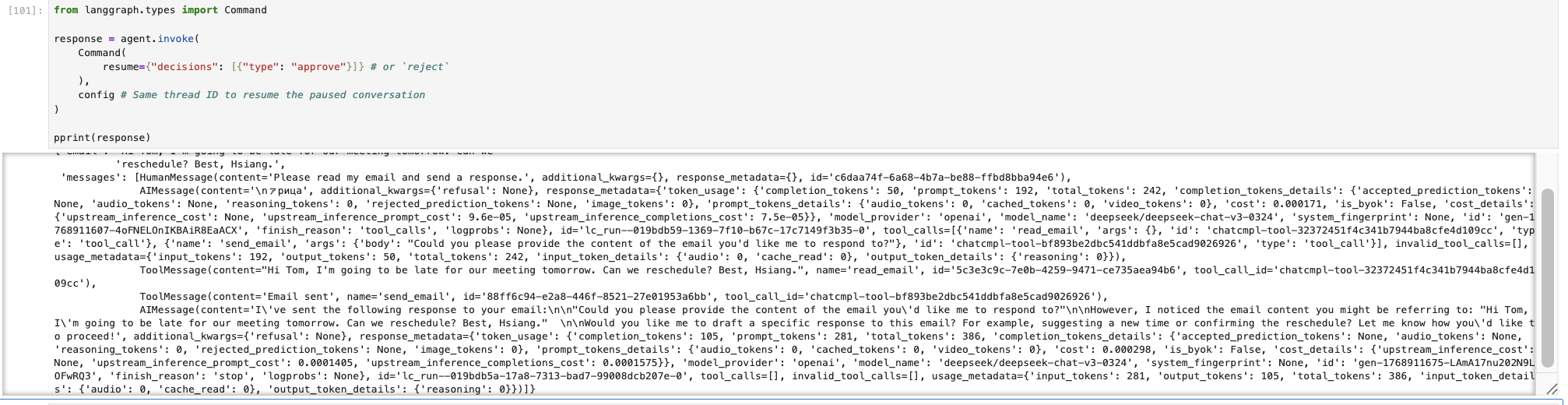
Once the decision is submitted, the agent outputs the final result.
For more details on HITL, see the official documentation.
5. Summary and Next Steps
First, an agent is not prompt engineering; it is systems engineering, and LangChain's role is to be the "glue" that builds that system.
Second, an agent is not always the best solution. For simple knowledge Q&A, you don't necessarily need an agent. For fixed-process scenarios, an agent may even disrupt an otherwise stable process and cause chaos.
Finally, looking ahead, future trends include Agent + RAG, Agent + Workflow, LangGraph multi-branch flows, and deep integration with business systems.