Setting Up a Chinese LaTeX Typesetting System on Linux
About TeX
TeX is a computer typesetting system originally created by Donald E. Knuth, professor at Stanford University. Most of you will know him from The Art of Computer Programming.
In fact, TeX was born because Knuth was unhappy with the proofs of that very book, which pushed him to build his own typesetting system. As the saying goes, one concrete need sets the direction better than ten universities.
You probably do everyday typesetting with WYSIWYG tools such as MS Word, or LibreOffice Writer on Linux. But for papers and books, those tools are child's play compared with TeX.
Enough background—today's topic is setting up TeX on Linux, so I'll get straight to it. If anything is unclear, search it yourself.
First, prepare the following packages or archives:
- texlive or tetex
- CJK
- Fonts, for example nsung-tl and nkai-tl (the trailing "tl" presumably stands for texlive)
Below is a brief introduction to what each one does.
1. texlive or tetex
This package is the main part of the whole typesetting system—its core. texlive and tetex are two distributions with essentially the same functionality; you only need one of them. The rest of this post uses texlive as the example, though many other software packages also implement a TeX system.
With texlive alone, TeX can in theory already typeset documents, but it only provides primitive commands. Using it directly is tedious and requires a lot more code. It is similar to writing a GUI program in plain C versus with MFC on Windows, or on Linux, writing a GUI in plain C against the Xlib X Window API versus using gtk+ or Qt (in C++).
Like TeX, LaTeX is a component of texlive. LaTeX's signature feature is automatic numbering—of chapters, sections, paragraphs, equations, figures, and tables—which makes typesetting far more convenient.
2. CJK
The original LaTeX does not support Chinese; it only supports English, i.e. ASCII characters below 0x80. To make LaTeX handle Chinese, you need to add macros to the LaTeX system. CJK handles not only Chinese but also Japanese and Korean—CJK stands for Chinese, Japanese, Korean.
3. Fonts
Installing the CJK macro package alone still won't let you output Chinese (compiling a .tex file will fail with a missing-font error). Punctuation in these fonts is treated as part of the Chinese font, so it does not affect how Chinese punctuation is rendered. Like the macro package, the fonts come as archives.
Step-by-step installation
Once everything above is downloaded, first install texlive so the system has a basic TeX environment. If this is your first texlive install, you need to install the install-tl-unx package beforehand; it contains Perl scripts that set up the prerequisites for installing texlive.
With the base TeX environment in place, LaTeX—which we definitely need—comes with it. You can think of LaTeX as an extension of TeX that makes the system much simpler and more convenient to use.
After texlive is installed, install the CJK macro package. It is an archive: extract it, then follow its texmf-relative directory layout and copy each file into the corresponding location under your system's texmf directory. This texmf directory may differ between Linux distributions: mine is /usr/share/texmf, some systems use /opt/texlive/texmf, and others even /usr/local/share/texmf.
After copying the CJK macros, run texhash to refresh the index so the TeX system can find the newly copied packages. (When you run texhash, the CJK directories and files are added to the ls-R index file.)
You're almost done at this point. But without fonts you still can't output Chinese. Font installation differs from the packages above: fonts are installed directly into the user's home directory, e.g. /home/xxx. Afterwards a texmf folder appears in your home directory containing the font data—don't delete it, or the fonts will be gone again.
Here is the font installation in more detail. Extract the font archive, cd into the extracted directory in a terminal, and ls will show an install.sh and an uninstall.sh.
To install the font, just run:
./install.sh
When you no longer want the font, just run:
./uninstall.sh
These fonts are installed into the user's texmf directory, so there's no need to switch to root, and the installed fonts only apply to that user.
I didn't go into detail about installing the software above; those are routine steps and are skipped here. For example, install rpm packages with rpm and resolve dependencies; for source builds, run
./configureto generate a Makefile, thenmake, thenmake install. Some have many options—check./configure --help. Those two make commands are the most basic; others such asmake dist/test/pdf/...(you can actually look them up in the Makefile) are things non-specialists can safely ignore.
Download links
install-tl-unx texlive clisp biblatex CJK Font files
Note: the tug.org site (TeX User Group) has plenty of other useful material—have a look around.
Example
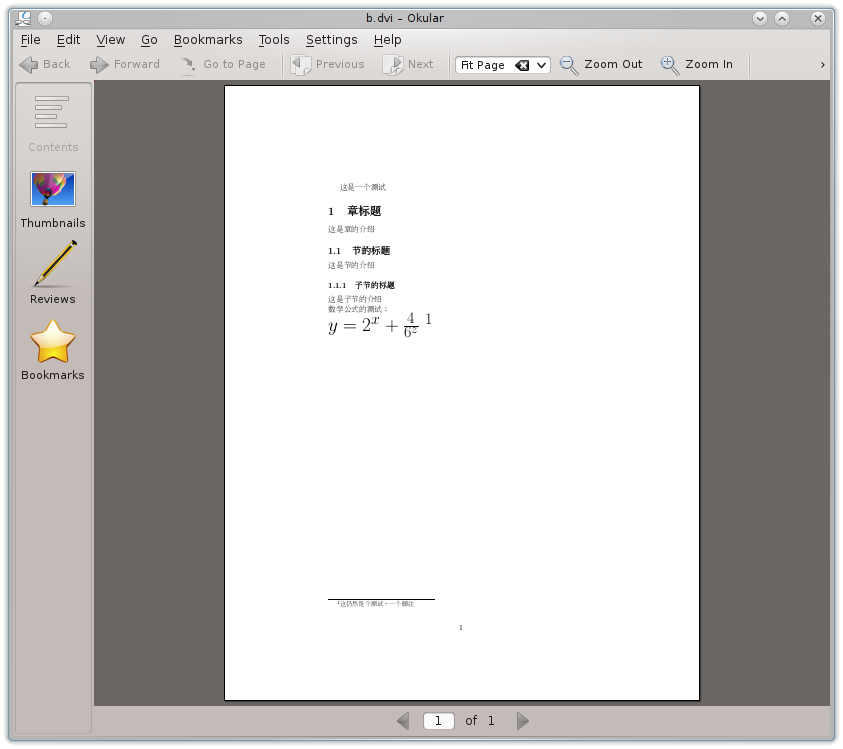
Here is a small test document I wrote:
\documentclass[10pt]{article}
\usepackage{CJK}
\begin{document}
\begin{CJK}{UTF8}{nsung}
这是一个测试
\section{章标题}
这是章的介绍
\subsection{节的标题}
这是节的介绍
\subsubsection{子节的标题}
这是子节的介绍 \\
数学公式的测试:\\
\Huge{$y=2^x+\frac{4}{6^z}$}
\footnote{这仍然是个测试,一个脚注}
\end{CJK}
\end{document}
The resulting .dvi output: