The Linux Boot Process
Loading the kernel
In the previous post I explained how computers boot, from early machines to modern ones, but I did not go deeper once we reached the operating system layer. In this post I use Linux as an example to describe how an operating system boots.
Kernel files are usually kept in the system's /boot directory, for example:
initramfs-linux.img
vmlinuz-linux
When GRUB (or LILO) loads the kernel, it maps vmlinuz-linux into memory and also loads an initial root filesystem image (initramfs-linux.img) into memory as a filesystem. The system boots from this mini initial filesystem, which in turn mounts the real on-disk filesystem. Every setup with an initramfs follows this flow. For systems without an initramfs (for example, the Slackware distribution), the kernel loads the filesystem directly from disk after it starts. Which path is used depends on the kernel configuration.
What does kernel initialization do?
Kernel initialization belongs to OS kernel internals. Broadly, the main parts are the following (for the many details, see books on the Linux kernel):
- The system starts in real mode and must switch to protected mode, so it sets up the GDT and LDT and configures flat-mode memory addressing; the GDT/LDT entries can specify memory protection bits, sizes, and similar information
- The bare system has no libraries to use, but don't forget the interrupt calls provided by the BIOS and the various I/O ports the BIOS has configured. Through them we can read and set hardware information and thus control the machine. We can wrap them into function calls; for historical compatibility some low interrupts must be preserved, so these functions are exposed as interrupt calls (i.e. by setting up the IDT, the interrupt descriptor table), providing a set of SYSCALLs following UNIX conventions
- In practice, computer memory is already very large, so we need a mechanism for fast address lookup. Without hardware support, software algorithms can achieve something similar, but the Intel platform provides Paging: we only need to set up the PDE tables (page tables), and the CPU performs the address translation automatically, which effectively gives hardware acceleration
- Once process-related and memory-related setup is done, next comes the filesystem, a fundamental element of the operating system (at least for now). The kernel reads file information according to the on-disk data format and builds in-memory data structures describing the files (usually not a simple bitmap-like table; in most cases it is more complex, i.e. a multi-level, extensible tree structure)
- Peripherals are the most complex part. They need various kinds of initialization before they can be used normally; this is generally called the device driver flow (this part can also be deferred and initialized later)
Loading the init program
Once the kernel has finished loading (which it will, as long as no error occurs), it starts the system's first process: the famous init process (PID 1). With the growth of the open-source community there have been many versions of init. The oldest and most stable is sysvinit; there are also alternatives such as Upstart, but systemd is the most favored, and it is currently the most actively developed open-source init project.
Systemd and sysvinit differ a lot, so I'll introduce them separately:
Upstart is an asynchronous, event-driven init system that is highly compatible with sysvinit, but it is not covered here; see other blogs or technical wikis about Upstart.
The sysvinit flow
Sysvinit startup can be viewed as two parts: initialization and service loading.
Initialization
Sysvinit reads /etc/inittab to decide what the system should do next. To decide the next step, there is a concept called the "runlevel", which determines the scenario the system boots into. Generally, Linux has the following 7 runlevels:
- 0 - halt
- 1 - single-user mode
- 2 - multi-user mode
- 3 - multi-user mode with networking
- 4 - user-defined
- 5 - full mode
- 6 - reboot
For the definition of runlevels, see Wikipedia.
The values above are not necessarily the same across Linux distributions.
The init program reads /etc/inittab, which stores what to do for each runlevel. Suppose the configuration is:
# These are the default runlevels in Slackware:
#   0 = halt
#   1 = single user mode
#   2 = unused (but configured the same as runlevel 3)
#   3 = multiuser mode (default Slackware runlevel)
#   4 = X11 with KDM/GDM/XDM (session managers)
#   5 = unused (but configured the same as runlevel 3)
#   6 = reboot

# Default runlevel. (Do not set to 0 or 6)
id:3:initdefault:

# System initialization (runs when system boots).
si:S:sysinit:/etc/rc.d/rc.S

# Script to run when going single user (runlevel 1).
su:1S:wait:/etc/rc.d/rc.K

# Script to run when going multi user.
rc:2345:wait:/etc/rc.d/rc.M

# What to do at the "Three Finger Salute".
ca::ctrlaltdel:/sbin/shutdown -t5 -r now

# Runlevel 0 halts the system.
l0:0:wait:/etc/rc.d/rc.0

# Runlevel 6 reboots the system.
l6:6:wait:/etc/rc.d/rc.6

# What to do when power fails.
pf::powerfail:/sbin/genpowerfail start

# If power is back, cancel the running shutdown.
pg::powerokwait:/sbin/genpowerfail stop

# These are the standard console login getties in multiuser mode:
c1:12345:respawn:/sbin/agetty --noclear 38400 tty1 linux
c2:12345:respawn:/sbin/agetty 38400 tty2 linux
c3:12345:respawn:/sbin/agetty 38400 tty3 linux
c4:12345:respawn:/sbin/agetty 38400 tty4 linux
c5:12345:respawn:/sbin/agetty 38400 tty5 linux
c6:12345:respawn:/sbin/agetty 38400 tty6 linux

# Local serial lines:
#s1:12345:respawn:/sbin/agetty -L ttyS0 9600 vt100
#s2:12345:respawn:/sbin/agetty -L ttyS1 9600 vt100

# Dialup lines:
#d1:12345:respawn:/sbin/agetty -mt60 38400,19200,9600,2400,1200 ttyS0 vt100
#d2:12345:respawn:/sbin/agetty -mt60 38400,19200,9600,2400,1200 ttyS1 vt100

# Runlevel 4 also starts /etc/rc.d/rc.4 to run a display manager for X.
# Display managers are preferred in this order:  gdm, kdm, xdm
x1:4:respawn:/etc/rc.d/rc.4
Each line can be thought of as a function.
The first column is the function's ID (a 2–4 character alphanumeric combination; it just has to be unique), the second column is the runlevel(s) it applies to, the third column is the action entry point within the runlevel, and the fourth column is the program or script to run.
The available actions include: initdefault, sysinit, boot, bootwait, wait, respawn
Take this function as an example:
id:3:initdefault:
At runlevel 3 the initdefault entry applies. It does not run any script or program; it simply marks the default runlevel. The other entries work the same way.
Looking at the inittab configuration above again, consider this line:
si:S:sysinit:/etc/rc.d/rc.S
It means that the /etc/rc.d/rc.S script runs at system boot. The /etc/rc.d/rc.S script handles:
- Mounting the
sysfsfilesystem - Mounting
tmpfs - Mounting the
procfilesystem - Mounting the
cgroupfilesystem - Starting other rc.XX scripts
- Loading required kernel modules
- Checking filesystems
- Seeding random numbers
- And so on
For functions spanning multiple runlevels:
rc:2345:wait:/etc/rc.d/rc.M
This means that in each of runlevels 2345, /etc/rc.d/rc.M is executed and init waits for it to complete.
The init configuration is very clear and straightforward; its startup scripts can be found under /etc/rc.d.
This is how the system loads the initialization scripts under rc.d, completing the entire init process sequentially.
Loading services
In sysvinit, services are loaded by the initialization scripts under /etc/rc.d. Usually each service has its own Shell management script that accepts arguments such as status, start, stop, and restart, placed under /etc/rc.d/init.d.
For example, given a service (/etc/rc.d/init.d/vbox-usb-service), we can run:
/etc/rc.d/init.d/vbox-usb-service status
to check whether it is running. Usually, for convenience, the system creates a symlink (if it doesn't, you can create it yourself):
/etc/init.d
This symlink points to /etc/rc.d/init.d, so we can also restart a service like this:
/etc/init.d/vbox-usb-service restart
This organization is not mandatory, though; management scripts can also live directly under /etc/rc.d, for example:
/etc/rc.d/rc.httpd
This is the management script for Apache's httpd service. Running:
/etc/rc.d/rc.httpd start
starts the httpd service.
Third-party services go under
/etc/rc.d/init.d; as long as these scripts are made executable, the initialization scripts load them automatically, with no need to modify the init scripts. The management scripts directly under/etc/rc.dare services shipped with the Linux distribution, which the init scripts already check for. If you want to put a third-party service script under/etc/rc.d, you must modify the init scripts.
The systemd flow
In systemd, everything is loaded as units. Many of these units can run concurrently to speed up booting, and each unit's predecessors and successors form a stable loading system.
Initialization
On a Linux system using systemd as init, see
man 7 bootupfor more details on how systemd boots.
Loading diagram
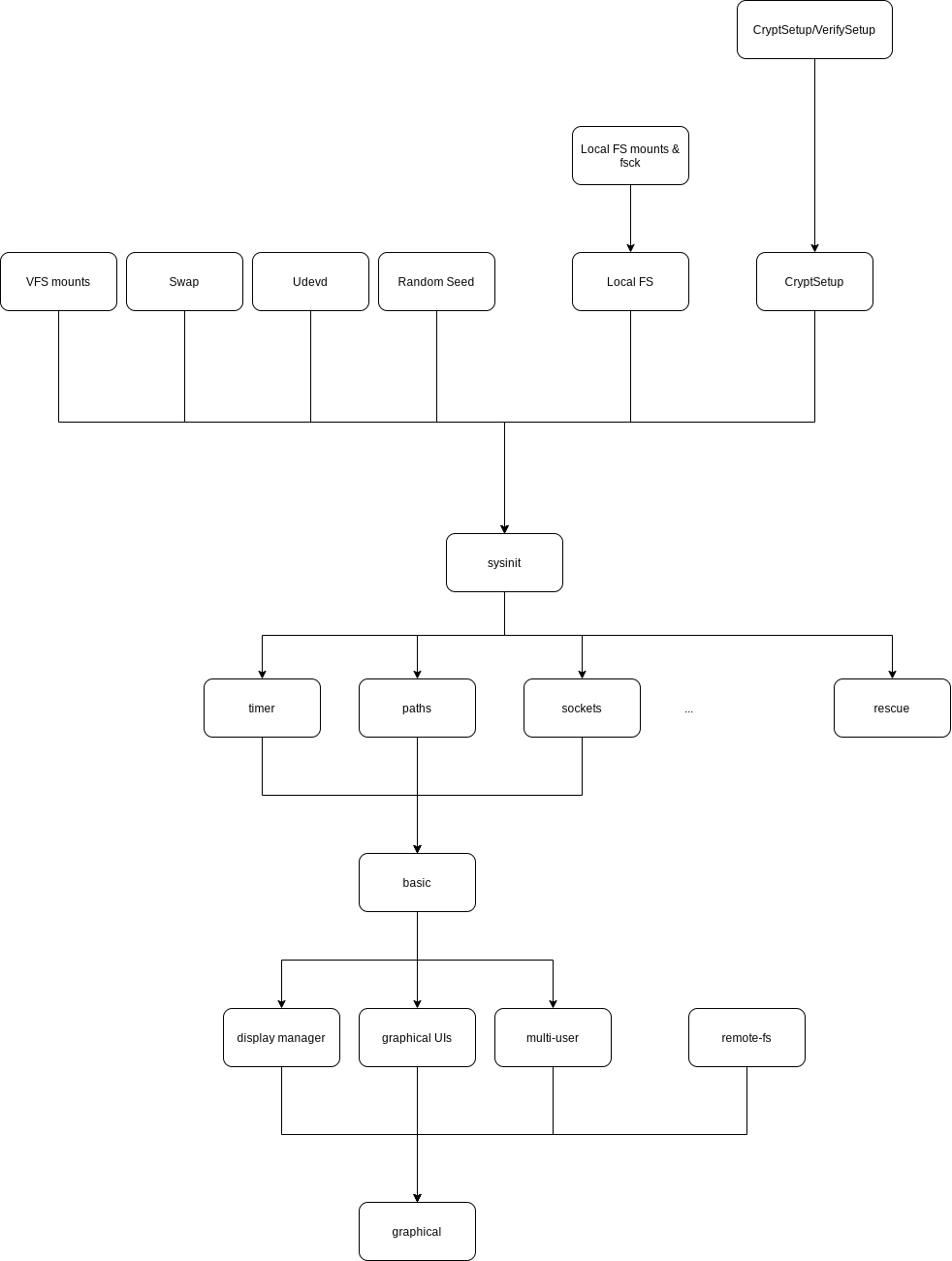
As the diagram shows, many services can be loaded before sysinit. These services are independent with no dependencies on each other, so they can be loaded in parallel. Once all of them have loaded, the sysinit target is considered complete, and loading moves on to the next services, and so on. Note that units like rescue serve special purposes (here, rescuing the system after a crash), and there are also services with an independent dependency chain, or no dependencies, that get pulled into the current stage, such as remote-fs in the diagram.
The systemd diagram above is rather rough; the real details are more complex. Some units load in several steps, and some break down into even finer-grained loading logic.
User login
After the necessary system services have started, there are several scenarios:
Runlevel 3 login
In this mode, the user logs in on a text console. init starts /sbin/agetty to prompt for a username and password; once getty and login verify the user, the user is let into the system and their Shell is started.
The configuration above allows 6 users to be logged in at the same time.
In addition, getty and login need to verify the password, usually by reading the stored settings under
/etc/passwdto validate the user.(For details, see the system function
getpass.)
Runlevel 4 login
In multi-user graphical mode, a service that manages system logins is started (PolKit/ConsoleKit are the most common). Taking ConsoleKit as an example: it lets a user log in again on the same hardware without logging out first. ConsoleKit abstracts logins into a session model to achieve this.
Graphical logins all work this way.
Under ConsoleKit, user validation is likewise done by reading the information in the
/etc/passwdconfiguration file.(For details on how verification works, see the security-related system function
crypt.)
Launching the user's Shell / WDM
Once the user enters a name and password that pass verification, init needs to run a Shell for the user so they can manage the system. There are many kinds of Shell, and users can freely choose one that suits their taste.
Common Shells include: Bash, Csh, Ash, Tcsh, Zsh, and so on
Once the Shell starts, it takes over the user's space, and the user can do anything through it via commands.
When a Shell starts, it reads the system-wide configuration, then reads the user's custom configuration from files under the user's $HOME directory.
Graphical logins are a bit different: instead of a Shell, they start an X Window WDM, i.e. a window/display manager, which takes over the user's space, initializes the graphical settings for the user, and displays the graphical interface.
Common WDMs include: GDM, SDDM, KDM, and so on