Designing a PE File Packer
Introduction
Today let's discuss packers for PE files. A packer is mainly used for commercially protecting a PE file so that the software is less likely to be cracked. As cracking knowledge becomes widespread, packers have grown increasingly complex just to barely hold out against being broken.
The loading process of a packer is covered in many books; let's review it here with a diagram:
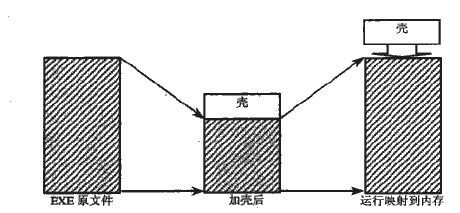
This diagram actually shows one case: the original program has been run through a compression engine. Alternatively, you can pack an EXE directly without compression, which saves the overhead of the packer's size but leaves the original EXE code uncompressed—so the file grows slightly. A third option is to insert into the gaps between the sections of the EXE: the resulting file is the same size as the original, but there are requirements on section sizes. These are the three conventional packing approaches.
If you just add a simple packer, the AddCode example in Luo Yunbin's Assembly Language Programming in the Windows 32-bit Environment is a typical representative. The main steps are:
First, add a section header entry to the section table and write the code at the end of the file (now matching the new section header). Pay attention to the section's SectionAlignment and FileAlignment; write the section header according to these two parameters, jump to the file offset corresponding to the section, and write the code. Where the code doesn't fill the section, pad with 0 to maintain file alignment (typically 200). Finally, wrap up: increment the PE file's NumberOfSections by 1; add to SizeOfImage the size of the new section aligned to SectionAlignment; align SizeOfHeaders to FileAlignment—if adding one IMAGE_SECTION_HEADER doesn't exceed FileAlignment, you may not need to change it; and SizeOfCode is the size of the added code, i.e. the sum of the sizes of the sections that contain code (this value is already aligned to FileAlignment in the section table).
What I just described is the second approach above. For the other two, the attachment below includes one that is similar to this approach, plus one using the third approach.
The method above is relatively simple to implement, but it provides no program-protection features. Next let's discuss a method with protection.
To implement protection, the things you can commonly protect are the import functions, export functions, code section, data section, and so on.
How to protect import functions?
In the DataDirectory of the PE header there is an import table that specifies an RVA and a size. Many PE analyzers—PEiD, LoadPE, and my own PE Scanner—find function information based on it.
After the PE file is loaded, this RVA points to an IMAGE_IMPORT_DESCRIPTOR, which is structured as follows:
typedef struct _IMAGE_IMPORT_DESCRIPTOR {
    union {
        DWORD   Characteristics;            // 0 for terminatin gnull import descriptor
        DWORD   OriginalFirstThunk;         // RVA to original unbound IAT (PIMAGE_THUNK_DATA)
    } DUMMYUNIONNAME;
    DWORD   TimeDateStamp;                  // 0 if not bound,
                                            // -1 if bound, and real date\time stamp
                                            //     in IMAGE_DIRECTORY_ENTRY_BOUND_IMPORT (new BIND)
                                            // O.W. date/time stamp of DLL bound to (Old BIND)

    DWORD   ForwarderChain;                 // -1 if no forwarders
    DWORD   Name;
    DWORD   FirstThunk;                     // RVA to IAT (if bound this IAT has actual addresses)
} IMAGE_IMPORT_DESCRIPTOR;

typedef IMAGE_IMPORT_DESCRIPTOR UNALIGNED *PIMAGE_IMPORT_DESCRIPTOR;
In this structure, OriginalFirstThunk and FirstThunk don't point to the same place, but the ThunkData they reference points to the same location—one is effectively a backup of the other. When the Windows loader loads the file, it replaces all the ThunkData pointed to by FirstThunk with the real addresses of the functions that the ThunkData refers to, as shown below:
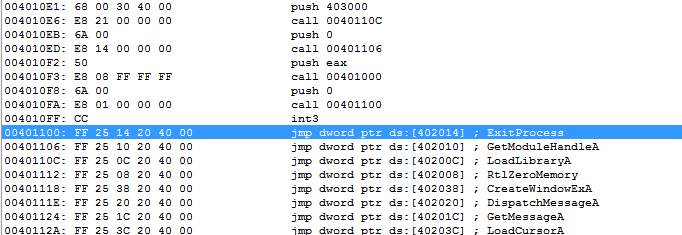
Before the program is loaded, the disk file looks like this:
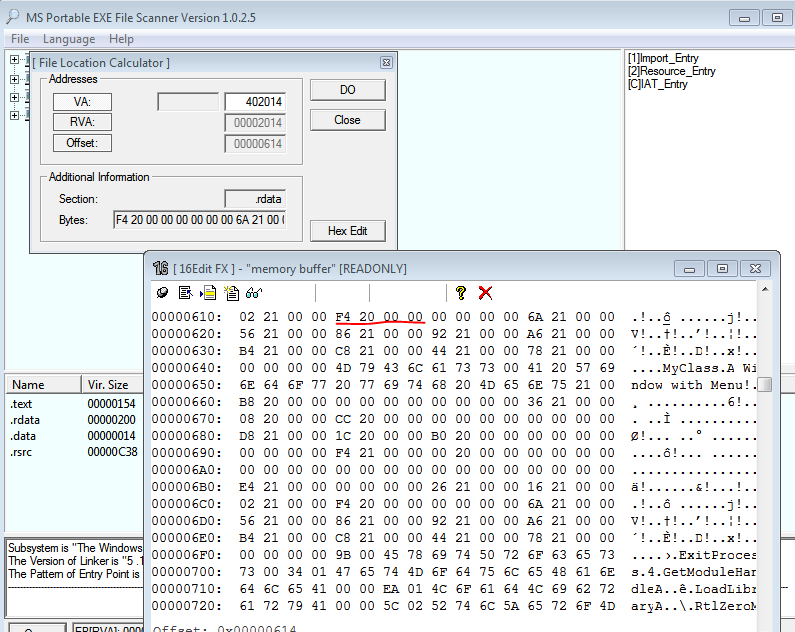
At location 402014 is 000020F4, which is an RVA; let's see where this ThunkData points, as follows:
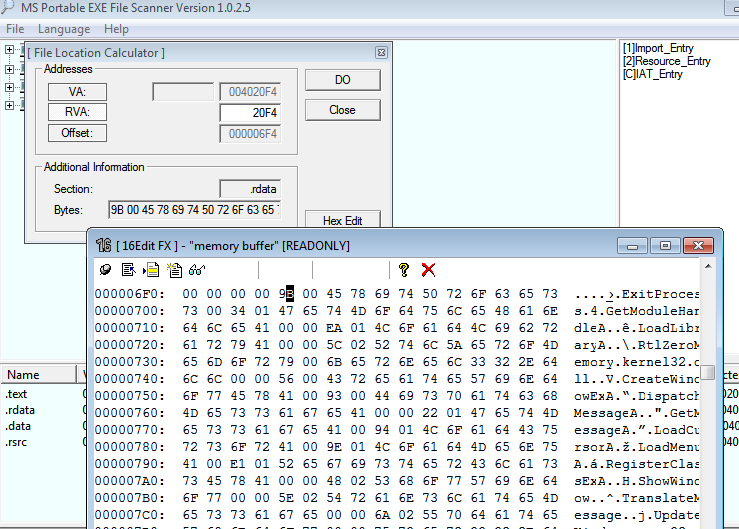
You can see that two bytes further on is the function name ExitProcess. This is an IMAGE_IMPORT_BY_NAME structure; the first two bytes are the HINT, an inconsequential WORD field. Now that we're roughly familiar with PE loading, note that if you write your own import-table protection, you'll have to perform these steps "by hand" in your own code.
Now let's look at the situation after the PE file is loaded, opening the file with WinDbg.
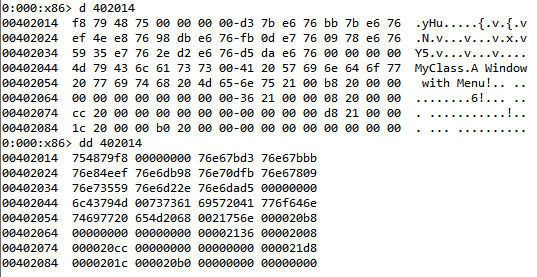
Location 402014 has been filled with data and is no longer the original RVA 000020F4:
JMP DWORD DS:[402014]
which becomes:
JMP 754879f8
Now look at the data at 754879f8:
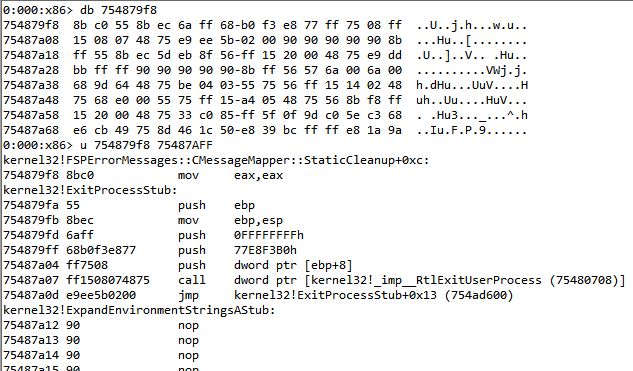
You can see it reaches ExitProcessStub in Kernel32, and the whole loading process is now clear.
How to load a "hidden" import table
So to protect the functions in the import table, you must "hide" the original import-table information (including the IMAGE_IMPORT_DESCRIPTOR and the series of ThunkData) and define your own IMAGE_IMPORT_DESCRIPTOR and ThunkData for the API functions you need. That way you don't have to do the complex work of finding Kernel32's base address in the heap, looking up export functions, and so on. For example, define your own two functions in Kernel32.dll—LoadLibraryA and GetProcAddressA—and hide the original import function information. When the program loads, you find these yourself and locate the functions in FirstThunk. Because the import table is "hidden," the PE loader hasn't replaced the ThunkData values with real function addresses like 754879f8, so you must find the functions yourself (there are two kinds: imported by ordinal and imported by name). Note that if the function you find is imported by ordinal, you must strip the high detection bit 1 (i.e. test against 80000000H) and then use it directly as the function name, calling GetProcAddressA to get the address. Getting the DLL name is even simpler and more direct: add Name's RVA to the base to obtain the DLL name string, which you can load with LoadLibraryA.
Through the steps above—for example, fixing up those locations like 402014—you load Kernel32.dll yourself with LoadLibrary, get the address of ExitProcess, and write the obtained address into location 402014, so that ExitProcess can execute properly. The same applies to the other functions; you must iterate over all the IMAGE_IMPORT_DESCRIPTORs to ensure every function address is filled into the right place.
Encrypting data and code
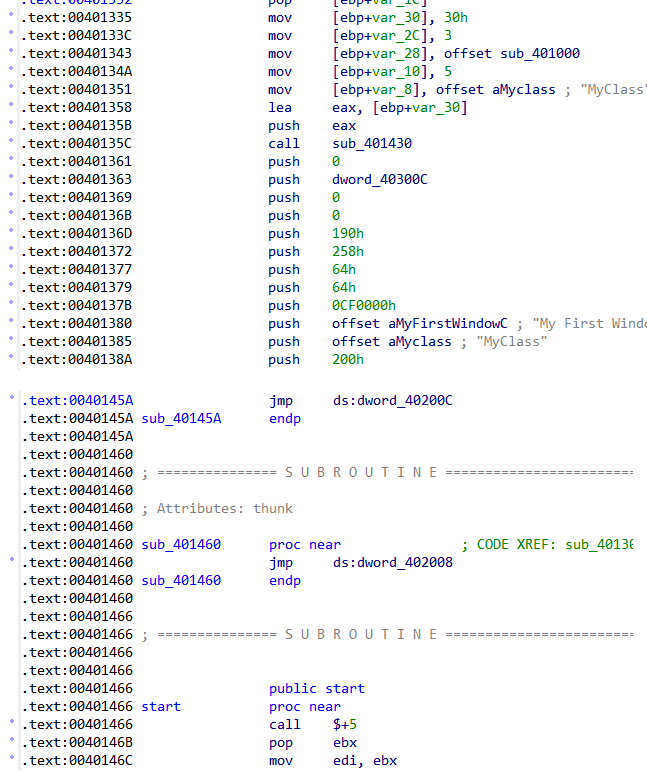
The methods above actually only protect the import table, but anyone with a bit of disassembly skill can read the earlier code: although the program's entry point has changed, the code is still there and can be seen by changing the offset. Compare the two images below:
Without the code section encrypted (start is my code):
With the code section encrypted (start is my code):
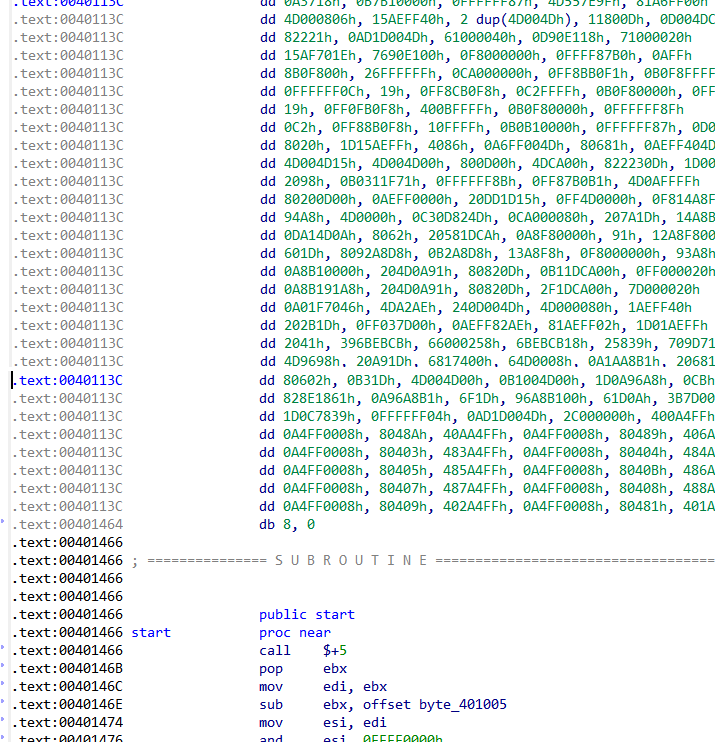
When the code section is encrypted, your own code must contain the decryption logic so the code can execute. My example here uses only simple bit rotation—rol, ror—so decryption is quite simple. To make it more complex, you could compress the code with a compression engine (lz77, lzss, or something more complex like Huffman coding), which also saves more space, or use other cryptographic principles to encrypt it; the details are up to you.
But this approach basically can't withstand scrutiny. ASPack, UPX, PECompact, and the one I wrote myself in the attachment all use this method.
This type of packer is very easy to unpack. Here's an example:
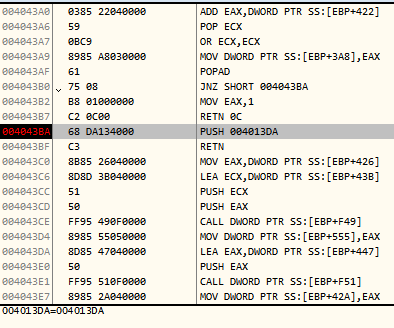
This is an ASPack-packed file. At the start, the value after the breakpoint's push is still 0; by this point it has become 004013da, which is exactly the original program's ep. In fact, ASPack's earlier work is much like my packer—nothing more than filling in ThunkData and decrypting data.
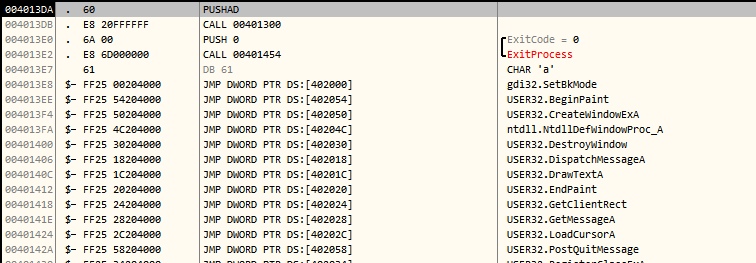
By this point you can see ASPack has filled in all the ThunkData. Dump it with OllyDump, then look at the import table information; use LoadPE to change NtDllDefWindowProc_A to DefWindowProcA, and unpacking is complete.
The reason this kind of packer is easy to unpack is that the shell code writes the code back to its original location after decrypting the program—like hiding something in a reliable container to protect it, but to use it you must take it out (the shell's self-decryption), and the moment it's taken out we can restore it to its original form!
If you designed a mechanism where, each time code needs to execute, it first reads the encrypted data, decrypts one instruction's worth of data, executes it, then fetches the next, decrypts, and executes—looping this way to the end, using only one instruction's worth of address space, with later code overwriting earlier code and short instructions padded with 90H (nop)—then the decrypted data isn't recorded, improving security. But this method has to deal with the length of the next instruction, which requires a small disassembly engine embedded in the packer, plus issues like where eip jumps—so it gets complex.
The idea of a virtual machine
The problem above leads to this one. A virtual machine is a mechanism that emulates CPU instruction execution, the I/O environment, and so on—common in VM software such as VMware and VirtualBox. A packer can also use this VM mechanism, except it mainly emulates CPU instructions (and can also emulate the I/O environment). You could make the mechanism above more complex: pop eax goes to the VM for execution and becomes dec eax; inc eax goes to the VM and becomes push eax; and it can be more elaborate—emulate your own I/O environment where each IN 45H means eax plus 1, each IN 46H means eax minus 1, IN 50H means ebx plus 1, and so on. (In short, emulate a brand-new instruction set. The first few ideas are just me letting my imagination run wild—don't take them too seriously. :)
The VM can also incorporate cryptographic encryption mechanisms, and more.
All in all, there's a lot to it, covering a wide range, and actually designing it would be a large undertaking—the packer's added code would probably be substantial too.
One final note
If the packed program is one with a randomized load base address, it may affect the proper execution of your decrypted code. In that case you need to fix the PE by removing the .reloc section—mainly zeroing out the random-relocation data entry in the DataDirectory, decrementing NumberOfSections by 1, and fixing SizeOfHeaders. You may not need to fix it, but most importantly you must zero out the DllCharacteristics value in the OptionalHeader.
Two of the items in the attachment add code into the free gaps of the program, so the program's free gaps must be fairly large or it will fail.
Link: my post on Pediy