Software Design Patterns - Structural Patterns
Structural patterns describe how classes and objects are assembled into larger structures while keeping those structures flexible and efficient.
The structural patterns covered here are: Adapter, Bridge, Composite, Decorator, Facade, Flyweight, and Proxy.
Adapter
The Adapter pattern solves the problem of making incompatible interfaces work together.
Adapters usually come in two flavors: object adapters and class adapters.
Object Adapter
An object adapter achieves adaptation by implementing the target interface, as shown below:
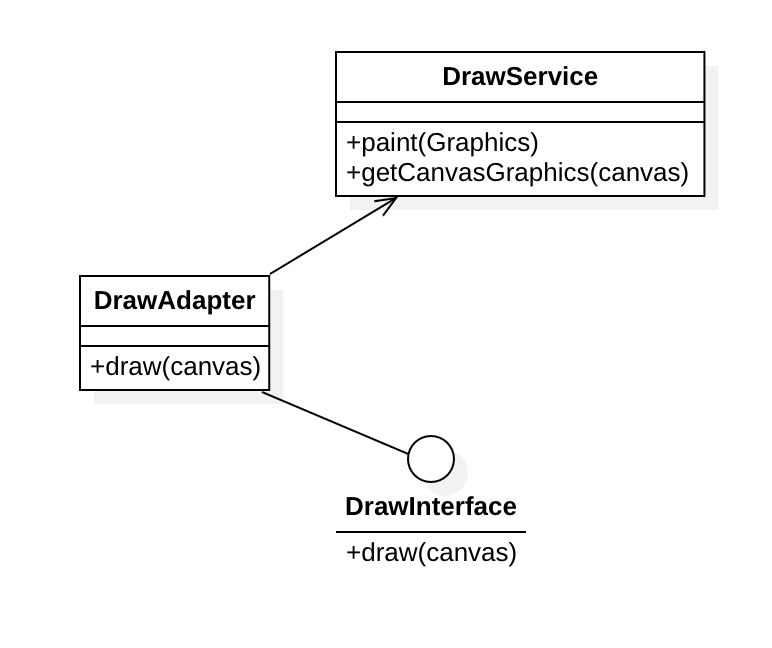
Sample code:
class DrawService {
    // Drawing service
public:
    void paint(Graphics&) {
        // Draw using Graphics
    }
    Graphics& getCanvasGraphics(canvas&) {
        // Convert graphics canvas
    }
};

class DrawInterface {
    // Drawing adapter interface
protected:
    void draw(canvas&) = 0;
};

class DrawAdapter : public DrawInterface {
    // Drawing adapter
protected:
    void draw(canvas& c) { // Adapt the interface
        auto g = service.getCanvasGraphics(c);
        service.paint(g);
    }
private:
    DrawService service;
};
Class Adapter
A class adapter relies on inheritance in object-oriented programming and is implemented through multiple inheritance.
As shown in the diagram:
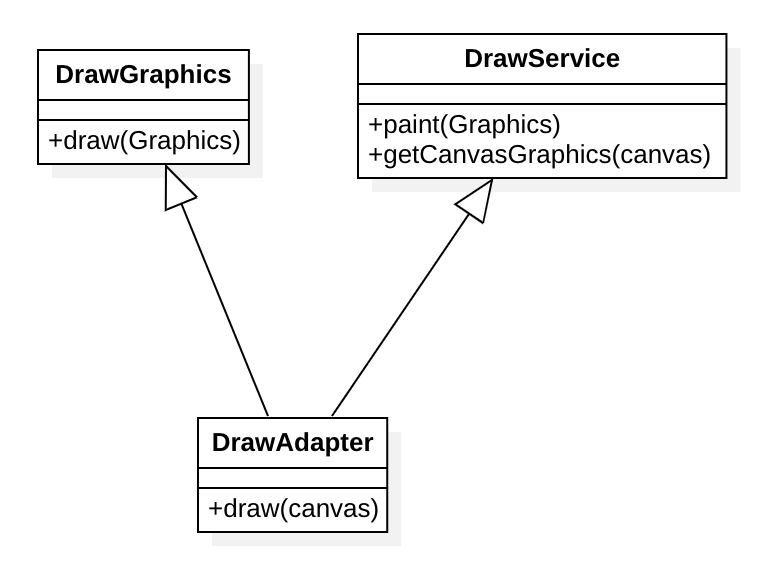
Sample code:
class DrawGraphics {
    // Pattern drawing
public:
    void draw(Graphics&) {
        // Draw function
    }
};

class DrawService {
    // Drawing service
protected:
    void paint(Graphics&) {
        // Draw
    }
    Graphics& getCanvasGraphics(canvas&) {
        // Convert canvas
    }
};

class DrawAdapter : public DrawGraphics, public DrawService {
    // Drawing adapter
public:
    void draw(canvas& c) {
        auto g = getCanvasGraphics(c);
        paint(g);
    }
};
Bridge
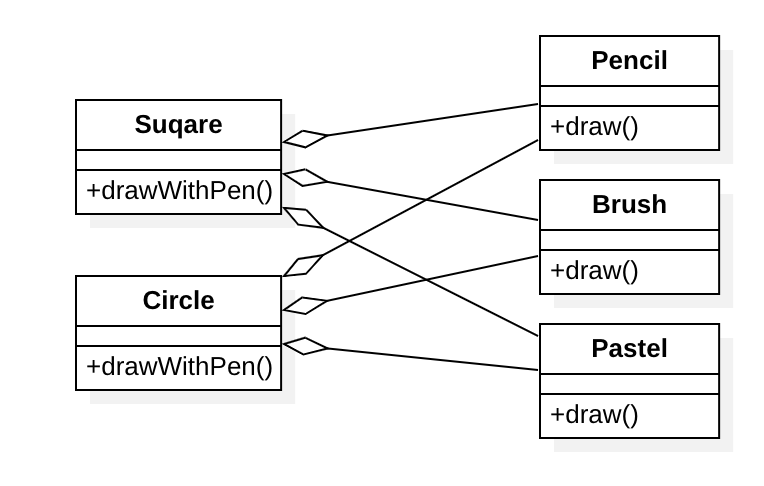
The Bridge pattern splits abstraction and implementation into two independent hierarchies, replacing inheritance across different dimensions with composition.
As shown below:
Sample code:
// Pen style

class Style {
public:
    void draw(Canvas&) = 0;
};

class Pencil : public Style {
public:
    void draw(Canvas&) {
        // TODO: pencil drawing implementation
    }
};

class Brush : public Style {
public:
    void draw(Canvas&) {
        // TODO: brush drawing implementation
    }
};

class Pastel : public Style {
public:
    void draw(Canvas&) {
        // TODO: pastel drawing implementation
    }
};

// Shape
class Square {
public:
    void drawWithPen(Style& pen) {
        pen.draw(this->getCanvas());
    }
};

class Circle {
public:
    void drawWithPen(Style& pen) {
        pen.draw(this->getCanvas());
    }
};
The shape classes are only the abstract drawing layer. They can draw figures in different styles, but the concrete drawing is actually carried out by pens of different styles.
Composite
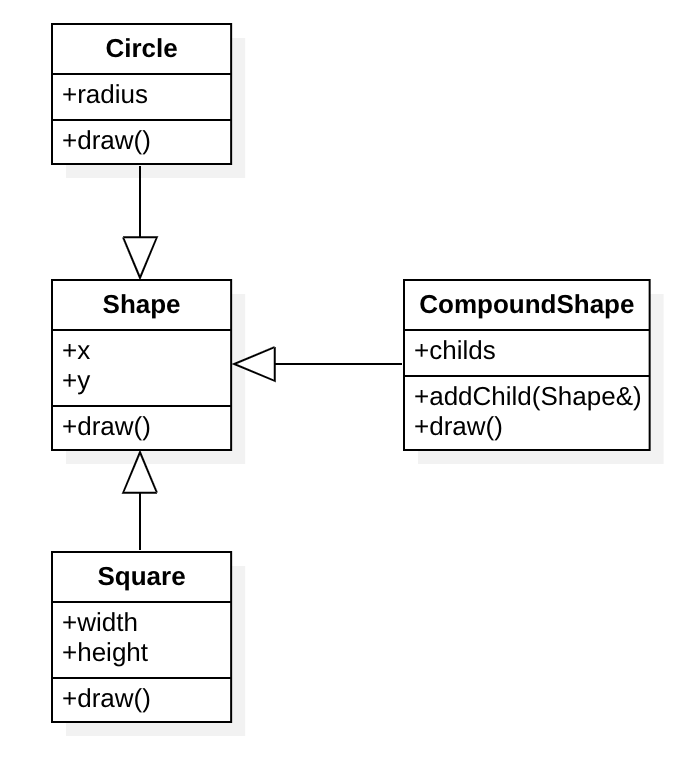
The Composite pattern composes objects into tree structures. It is most often implemented as an interaction between a "Box" and an "Item": a box is itself an item, and a box can hold items, which produces a recursively nested structure.
The structure looks like this:
Sample code:
class Shape {
public:
    void draw() = 0;
protected:
    float x, y;
};

class Circle : public Shape {
public:
    void draw() {
        // Draw a circle
    }
private:
    float radius;
};

class Square : public Shape {
public:
    void draw() {
        // Draw a square
    }
private:
    float width, height;
};

// Composite shape
class CompoundShape : public Shape {
public:
    void draw() {
        // Iterate and draw all child shapes
    }
private:
    std::vector<Shape> childs;
};
Decorator
The Decorator pattern lets you place an object inside a special wrapper object that carries some behavior, thereby attaching the wrapper's new behavior to the original object.
The structure looks like this:
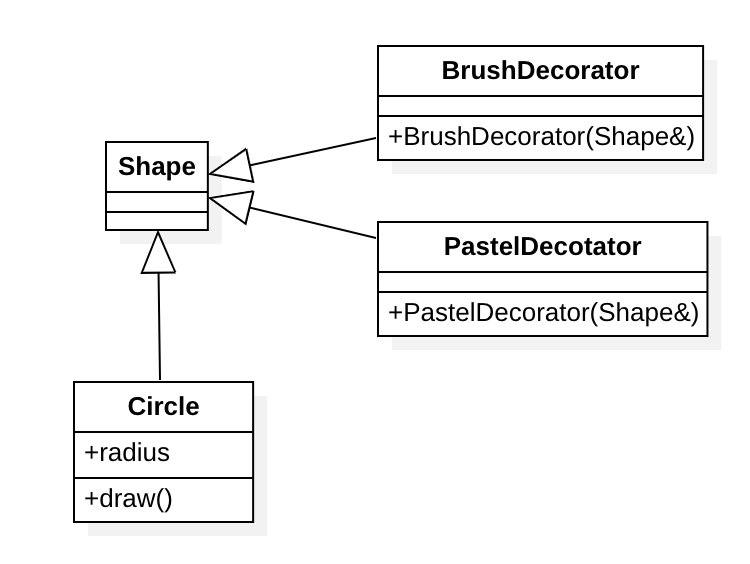
class Shape {
public:
    virtual draw() = 0;
};

class Circle : public {
public:
    void draw() {
        // TODO: draw
    }
private:
    float radius;
};

// Decorator
class BrushDecorator : public Shape {
public:
    BrushDecorator(Shape& s) {
        // TODO: set brush style
    }
    void draw() {
        // Draw
        Shape::draw();
    }
};

class PastelDecorator : public Shape {
public:
    PastelDecorator(Shape& s) {
        // TODO: set pastel style
    }
    void draw() {
        // Draw
        Shape::draw();
    }
};
Using the decorators looks like this:
Circle circle;

auto circleWithBrush = new BrushDecorator(circle);
auto circleWithPastel = new PastelDecorator(circle);
auto circleWithBrushPastel = new PastelDecorator(circleWithBrush); // Nested decoration

circleWithBrush.draw();
circleWithPastel.draw();
circleWithBrushPastel.draw();
Facade
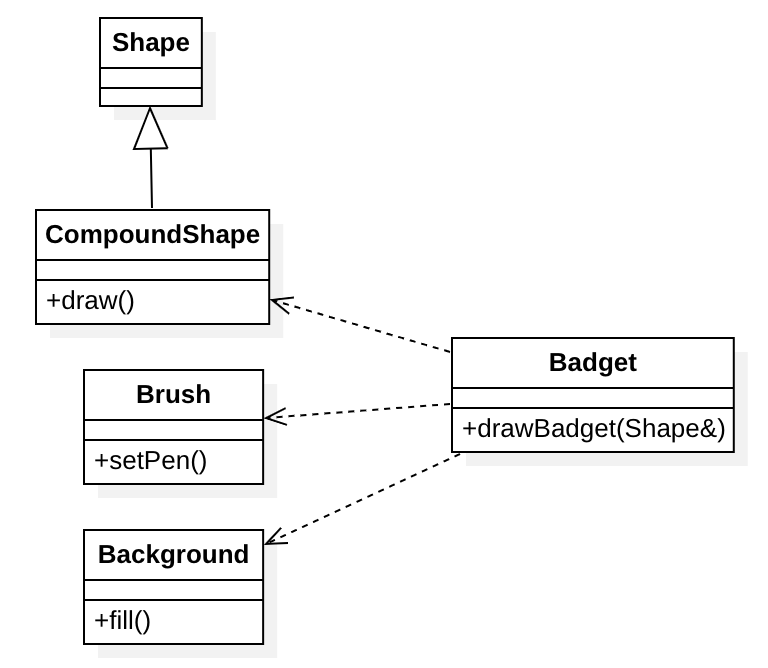
The Facade pattern provides a simple interface to a library or framework. Exposing fewer details to the outside world reduces coupling across the system.
The following example designs a uniform style for drawing badges:
Sample code:
class Shape {
public:
    void draw(Canvas&) = 0;
};

class CompoundShape : public Shape {
public:
    void addChild(Shape& c) {
        // Add shapes
    }
    void draw(Canvas&) {
        // Draw shapes
    }
private:
    std::vector<Shape> childs;
};

class Brush {
public:
    void setPen(Canvas&);
};

class Background {
public:
    void fill(Canvas&);
};

class Badget {
public:
    void drawBadget(Shape& s) {
        // Draw badge
        auto canvas = this->getCanvas();
        assert(canvas != nullptr);
        br.setPen(*canvas);
        bg.fill(*canvas);
        s.draw(*canvas);
    }
private:
    Brush br;
    Background bg;
    CompundShape cshape;
};
An external caller only needs to call drawBadget() and pass the badge's complex shape as an argument to draw any kind of badge.
Flyweight
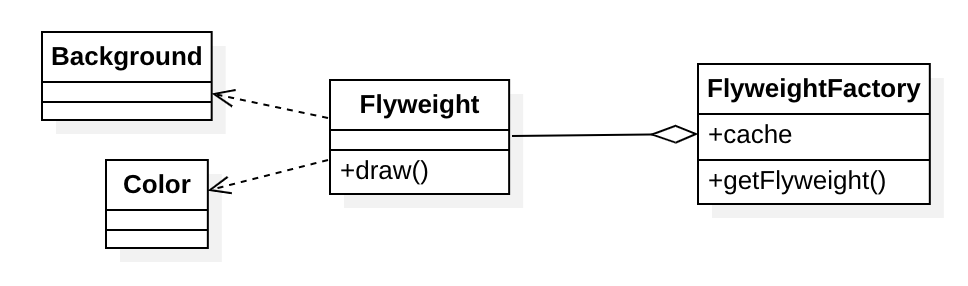
The Flyweight pattern shares object state so that each object does not have to hold all of its state, which lets you fit many more objects into memory.
A typical use case is game development. One of the most common elements in a game is the particle system, where each particle has its own coordinates, color, state, and so on. If every particle object stored all of that information, a real game scene would demand an enormous amount of memory: a few hundred thousand particles could exhaust system memory and trigger an OOM. To solve this, analyze the particle class, separate its constant parts from its variable parts, and store the constant parts in shared objects.
As shown below:
Sample code:
class Background {};

class Color {};

class Flyweight {
public:
    void draw() {
        // Draw particles
    }
private:
    Background bg;
    Color cr;
};

class FlyweightFactory {
public:
    Flyweight* getFlyweight(state s) {
        auto f = cache.find(s);
        if (f != nullptr) return f;
        return new Flyweight();
    }
private:
    Cache cache;
};
Before using the Flyweight pattern you also need an initialization step that stores the constant objects in the flyweight factory's cache.
// Initialize the flyweight factory
auto particle1 = new Flyweight(1); // Static particle 1
auto particle2 = new Flyweight(2); // Static particle 2
// ...

FlyweightFactory::getInstance().addFlyweight(particle1);
FlyweightFactory::getInstance().addFlyweight(particle2);

auto particle = FlyweightFactory::getInstance().getFlyweight(-1); // Regular dynamic particle
Proxy
The Proxy pattern provides a placeholder for an object and controls access to the original object, so extra processing can be added before and after external requests reach it.
Sticking with the drawing example: this time we draw images, which are stored in a database with a tag as each image's unique name. Every draw has to fetch the corresponding images from the database before drawing them. When a figure is complex and contains many images, drawing becomes slow and the UI visibly lags. The root cause is the accumulated time spent fetching images from the database. The Proxy pattern addresses this, as shown below:
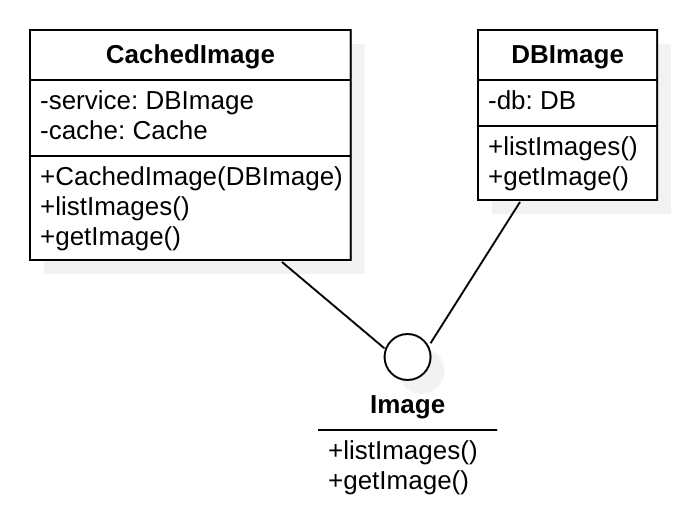
When the proxy fetches an image, it caches it. The next time the same image is requested, the proxy returns it immediately, which greatly cuts drawing time and makes drawing more efficient.
Sample code:
class Image {
public:
    std::vector<std::string> listImages() = 0;
    std::vector<uint8_t> getImage(std::string&) = 0;
};

class DBImage : public Image {
public:
    std::vector<std::string> listImages() {
        auto result = db.findAll();
        // Query the database and return the tag list of all images
    };
    std::vector<uint8_t> getImage(std::string&) {
        // Return the image data for the given tag
    };
private:
    DB db;
};

class CachedImage : public Image {
public:
    CachedImage(DBImage& dbi) {}
    std::vector<std::string> listImages() {
        auto result = cache.findAll(); // Cache lookup
        if (!result.empty()) {
            return result;
        }
        result = service.findAll(); // Lookup via the original service
        cache.store(result);
        return result;
    };
    std::vector<uint8_t> getImage(std::string& tag) {
        auto img = cache.find(tag); // Look up image in cache
        if (!img.empty()) {
            return img;
        }
        img = service.find(tag); // Fetch image from the original service
        cache.store(tag, img);
        return img;
    };
private:
    DBImage service;
    Cache cache;
};
In practice, callers simply use the proxy directly:
DBImage dbi("mongo://xxxx");
CachedImage ci(dbi);

auto result = ci.listImages();
auto image = ci.getImage(result[0]); // Image for the first tag
CacheImage
Depending on the actual scenario, the Cache used in CacheImage can be middleware storage such as Memcached or Redis.
MVC
MVC stands for Model-View-Controller. It is used for layered application development: it reduces coupling between data, the view (UI), and control logic, making development and maintenance clearer.
This pattern was widely used in the traditional MFC development framework. Below is an MVC design for a rich text editor.
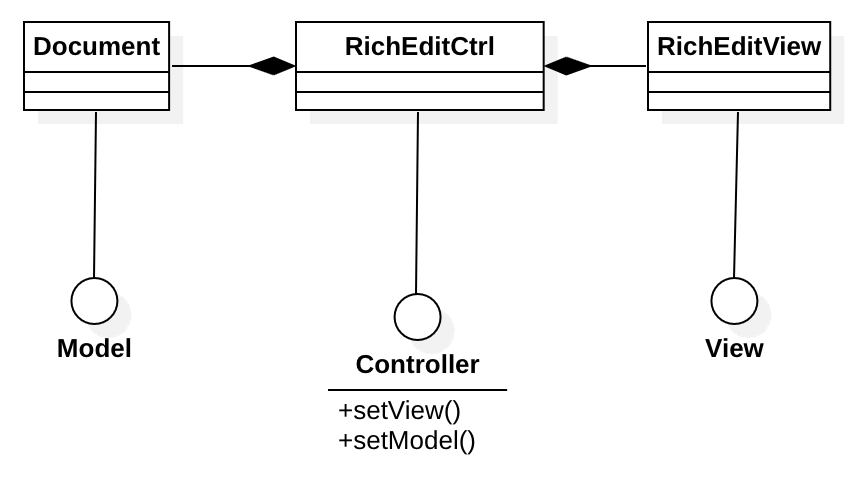
The code:
class Model {};

class View {};

class Controller {
public:
    void setView() = 0;
    void setModel() = 0;
};

class Document : public Model {
public:
    Document(Controller* ctrl) {
        this->ctrl = ctrl;
    }
private:
    Controller* ctrl;
};

class RichEditCtrl : public Controller {
public:
    void setView(View* v) {
        this->view = v;
    }
    void setModel(Model* m) {
        this->model = m;
    }
private:
    View* view;
    Model* model;
};

class RichEditView : public View {
public:
    View(Controller* ctrl) {
        this->ctrl = ctrl;
    }
private:
    Controller* ctrl;
};
Constructing the MVC looks like this:
RichEditCtrl ctrl;
RichEditView view(&ctrl);
Document doc(&ctrl);
ctrl.setView(&view);
ctrl.setModel(&doc);

// The view notifies the controller of updates
ctrl.notify();
// The controller updates the data model
doc.update();
// The model refreshes the view after updating
view.refresh();