Software Design Patterns - Behavioral Patterns
Behavioral patterns deal with efficient communication between objects and the delegation of responsibilities.
The behavioral patterns covered here are: Chain of Responsibility, Command, Iterator, Mediator, Memento, Observer, State, Strategy, Template Method, and Visitor.
Chain of Responsibility (CoR)
The Chain of Responsibility pattern lets you pass a request along a chain of handlers. When a handler at any node receives the request, it can either process it or pass it on to the next handler in the chain.
For example:
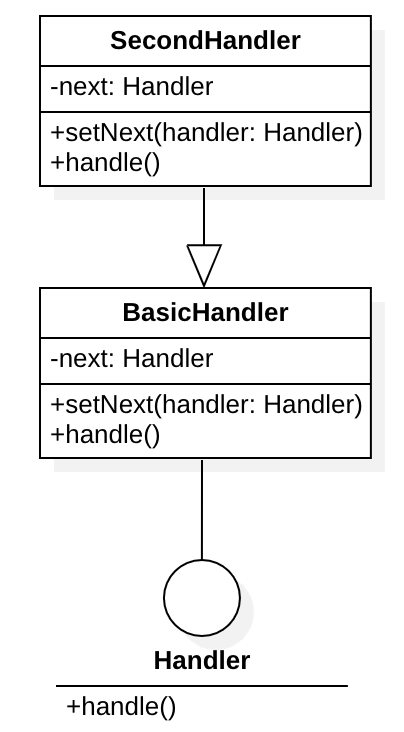
This is just a two-level chain.
Sample code:
class Handler {
public:
    void handle() = 0;
};

class BasicHandler : public Handler {
public:
    void handle() {
        // TODO: perform the first-level handling
        if (okay && next != nullptr) {
            next(); // pass to the next handler in the chain
        }
    }
    void setNext(Handler& hdr) {
        next = hdr
    }
private:
    Handler next;
};

class SecondHandler : public Handler {
public:
    void handle() {
        // TODO: perform the required handling
    }
    // the last handler does not need a next
    // void setNext(Handler& hdr) {
    //     next = hdr
    // }
private:
    // Handler next;
};
Command
The Command pattern turns a request into a standalone object that contains all the information about that request. These objects are kept in a queue, and queued elements can be undone.
Take the design of an editor application as an example:
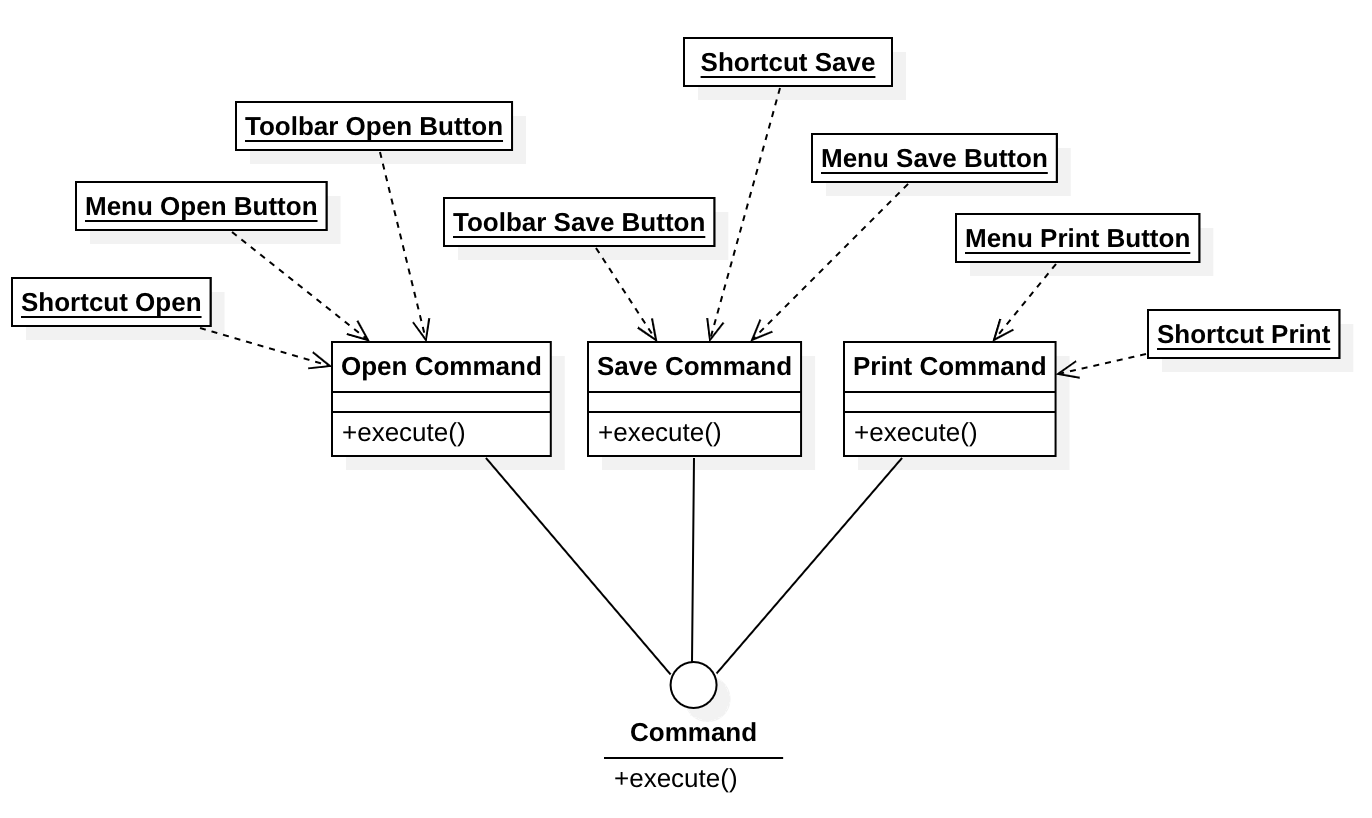
Sample code:
class Command {
public:
    void execute() = 0;
};

// Open file
class OpenCommand : public Command {
public:
    void execute() {
        // Perform the file-open operation
    }
};

// Save file
class SaveCommand : public Command {
public:
    void execute() {
        // Perform the file-save operation
    }
};

// Print file
class PrintCommand : public Command {
public:
    void execute() {
        // Perform the file-print operation
    }
};
We also need a command queue mechanism:
// Command queue
class CommandQueue {
public:
    void push(Command&) {
        // Enqueue a command
    }
    Command pop() {
        // Dequeue a command
    }
};
The command queue stores commands, and enqueuing and dequeuing follow some scheduling algorithm:
CommandQueue cq(10);

// Any scheduling strategy works; a timer is used here
while (true) {
    std::this_thread::sleep_for(std::chrono::seconds(1));
    auto cmd = cq.pop();
    cmd.execute();
}
To undo, simply pop the element off the queue without executing it:
cq.pop();
Creating an "Open" menu action only takes the following:
auto openCmd = new OpenCommand();
auto menuOpen = new Menu("Open");
menuOpen.action = [openCmd](){
    cq.push(openCmd); // push the open command onto the queue
};
Iterator
The goal of the Iterator pattern is to let outside code traverse every element of a collection without exposing the collection's underlying representation.
The structure looks like this:
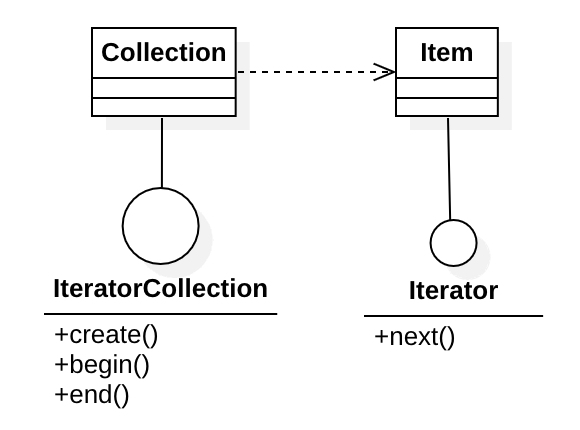
First, define a collection:
// Iterator
class Iterator {
public:
    Iterator next() = 0;
};

class Item : public Iterator {
public:
    Item next() {
        // Next element
    }
};

// Iterable collection
class IteratorCollection {
public:
    Iterator create(Iterator) = 0;
    Iterator begin() = 0;
    Iterator end() = 0;
};

class Collection : public IteratorCollection {
public:
    Iterator create(Iterator) {
        // Create an iterator
    }
    Iterator begin() {
        // Return an iterator to the first element
    }
    Iterator end() {
        // Return an iterator to the last element
    }
};
The iterator collection can be built like this:
Collection collection;
Item empty;
first = collection.create(empty);
second = collection.create(first);
third = collection.create(second);
There are many ways to build an iterator collection: one element at a time through a function as above, or all at once through a constructor.
Collection collection([1,2,3,4,5,6,7,8]);
Use the iterator collection to access the iterator elements:
for (auto it = collection.begin(); it != collection.end(); it = it.next()) {
    // Access the element via iterator it
}
Mediator
The Mediator pattern reduces chaotic, tangled dependencies between objects. It restricts direct interaction between objects and has them interact through a mediator object instead.
Consider a form UI where the user fills in name, date of birth, gender, and so on. Updating one field also triggers changes in other UI elements; for example, entering a date of birth updates the age in the form. If every UI control talked to the others directly to update them, the result would eventually be a mess. A mediator prevents that mess.
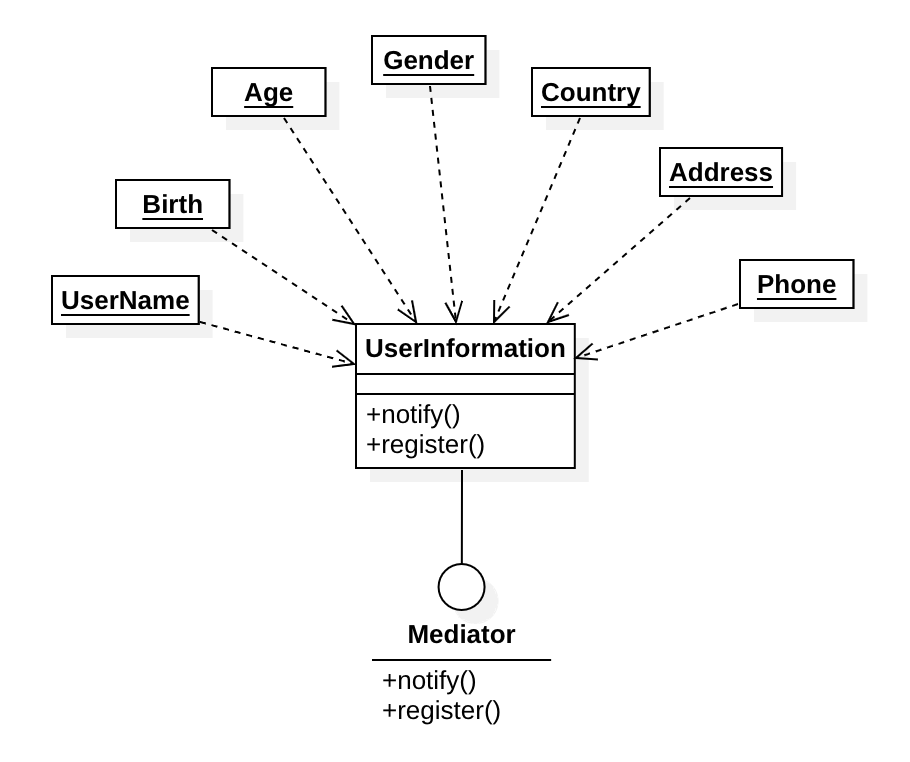
As shown above, changing the date of birth updates the age, and routing this through the mediator avoids the chaos caused by direct calls.
class Mediator {
public:
    void notify(int type, std::string param) = 0;
    bool registerObject() = 0;
};

class UserInformation {
public:
    void notify(int type, std::string param) {
        // Notify different objects to update the UI based on type
    }
    bool registerObject() {
        // Register a UI object
    }
private:
    std::vector<UIObject> objects;
};
In use, the in-memory environment keeps a single user-information object, defined like this:
UserInformation info;
info.registerObject(userNameLabel);
info.registerObject(birthLabel);
info.registerObject(ageLabel);
// ...
When the user changes the value of a UI control:
info.notify(123, "1975-02-12"); // assume 123 is the "birth date updated" event; the argument is the new date
Memento
The Memento pattern lets you save and restore an object's previous state without exposing its implementation details.
Editor applications generally support undo and redo, which can be implemented like this:
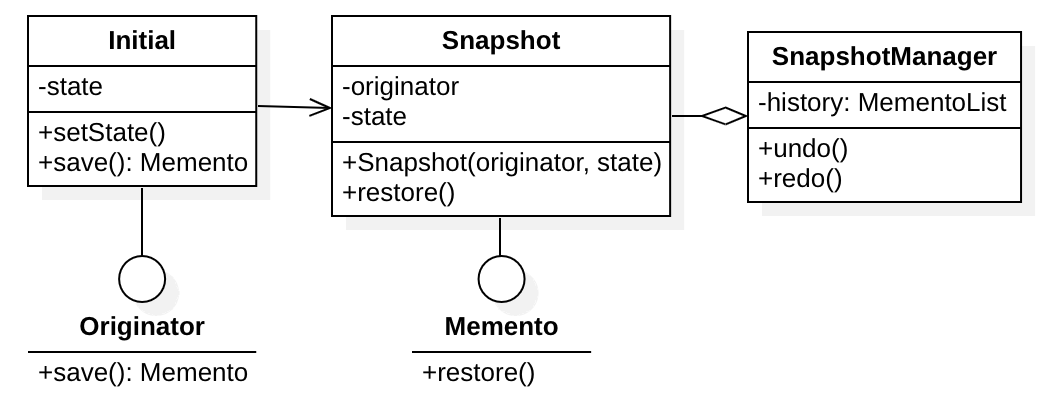
In the diagram, opening a document creates an initial originator. The next snapshot is based on that originator, and so on. Snapshots are stored and managed in a snapshot list. The code:
class Memento {
public:
    void restore() = 0;
};

class Originator {
public:
    Memento* save() = 0;
};

class Snapshot : public Memento {
public:
    Snapshot(Memento* m, int s) {
        originator = m;
        state = s;
        // Save the operation state
    }
    void restore() {
        // Restore the operation state
    }
};

class Initial : public Originator {
public:
    void setState(int state) {
        this->state = state;
    }
    Memento* save() {
        return Snapshot(this, state);
    }
private:
    int state;
};
Define a caretaker that manages snapshots, creating and restoring them:
std::vector<Snapshot*> snapshots;
// Initialize the originator
Initial init;
init.setState(0);
// Save a snapshot
Snapshot* s1 = new Snapshot(init, 1);
snapshots.push_back(s1);
// Restore the snapshot
auto s = snapshots.pop_back();
s->restore();
Observer
The Observer pattern is a publish-subscribe mechanism: when an object's state changes, it notifies multiple other "observing" objects.
Take a code editor as an example. A code editor is not just a text editor; it also supports syntax highlighting, auto-indentation, automatic bracket matching, and other features driven by the code text.
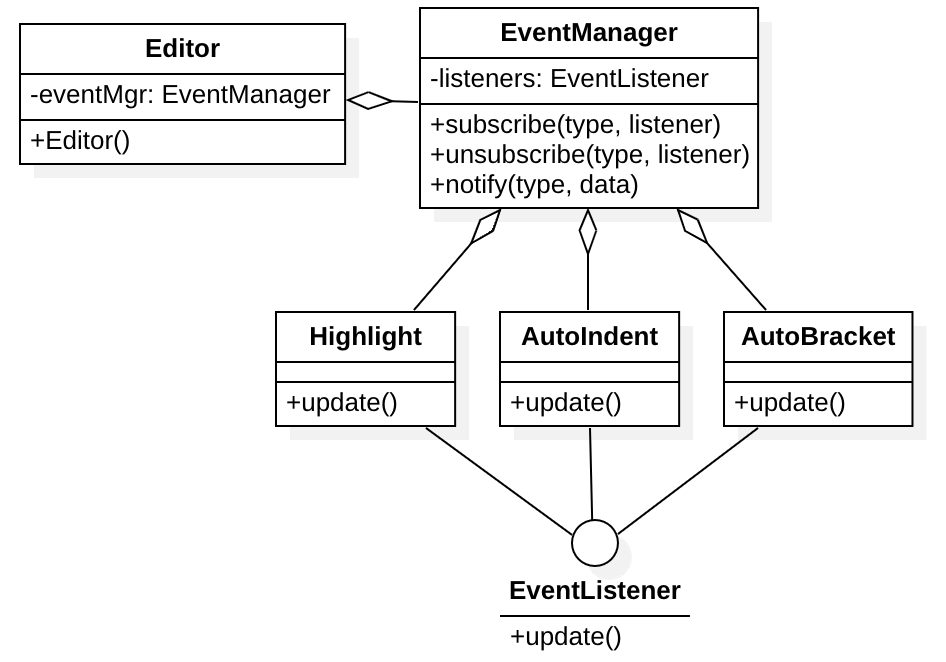
The implementation:
class EventListener {
public:
    void update() = 0;
};

class Highlight : public EventListener {
public:
    void update() {
        // Update syntax highlighting
    }
};

class AutoIndent : public EventListener {
public:
    void update() {
        // Update auto-indentation
    }
};

class AutoBracket : public EventListener {
public:
    void update() {
        // Update bracket matching
    }
};

class EventManager {
public:
    void subscribe(int type, EventListener* listener) {
        auto it = listeners[type];
        if (it == nullptr) {
            it = initListenerList(); // initialize the listener list
            listeners.insert(std::make_pair(type, it));
        }
        it->push_back(listener); // add the listener
    }
    void unsubscribe(int type, EventListener* listener) {
        auto it = listeners[type];
        if (it == nullptr) return;
        if (find_if(it, listener)) { // look up the listener
            it = remove_if(it, listener); // remove it
            listeners[type] = it;
        }
    }
    void notify(int type, DataFrame* data) {
        // Iterate over all listeners of this event and notify them
        auto it = listeners[type];
        if (it == nullptr) return;
        for (l := it->begin(); l != it->end(); l = l->next()) {
            l->update(); // notify the event
        }
    }
private:
    std::map<int, ListenerList*> listeners;
};

class Editor {
public:
    Editor() {}
private:
    EventManager eventMgr;
};
State
The State pattern means that when an object's state changes, its behavior changes too. The core idea comes from finite state machines.
A thermostat-controlled air conditioner is one of the simplest state machines, as shown below:
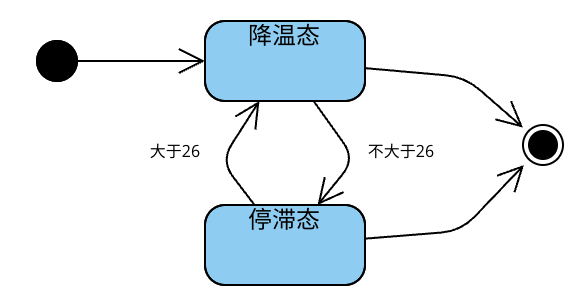
The class definition for the state model:
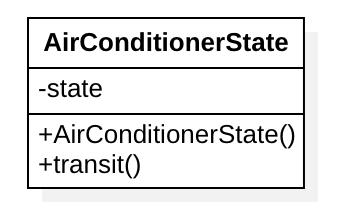
The code:
class AirConditionerState {
public:
    AirConditionerState() {
        // Initialize the state transition table
        transits.insert(compound(STATE_START, SYM_RDY), STATE_ON);
        transits.insert(compound(STATE_ON, SYM_BELOW), STATE_WAIT);
        // ...
    }
    void transit(int cur) { // transition function
        auto sym = cur > 26 ? SYM_ABOVE : SYM_BELOW;
        auto key = compound(state, sym);
        auto val = transits.find(key);
        state = val;
    }
private:
    int state;
    std::map<int, int> transits;

    inline int compound(int state, int symbol) {
        return state | (symbol << 16);
    }
};
On each call, just pass the current temperature to transit(). The function switches states in the state table based on the current state and the input symbol.
How state machines work
A state machine consists of a symbol table, a state table, a transition function, and start and end states. In one sentence: a state machine uses symbols from the symbol table to move between states in the state table via the transition function. State machines are divided into finite and infinite state machines; an infinite state machine's state table differs in size from a finite one's and may contain infinitely many states. Finite state machines are used in compilers, both for lexical analysis and for building formal syntax analysis.
Strategy
The Strategy pattern lets an algorithm be customized. For example, suppose some software supports machine learning. To use it, we choose a model and train it, then use it for real predictions later. The model can be abstracted as a strategy, and choosing among models is choosing among strategies.
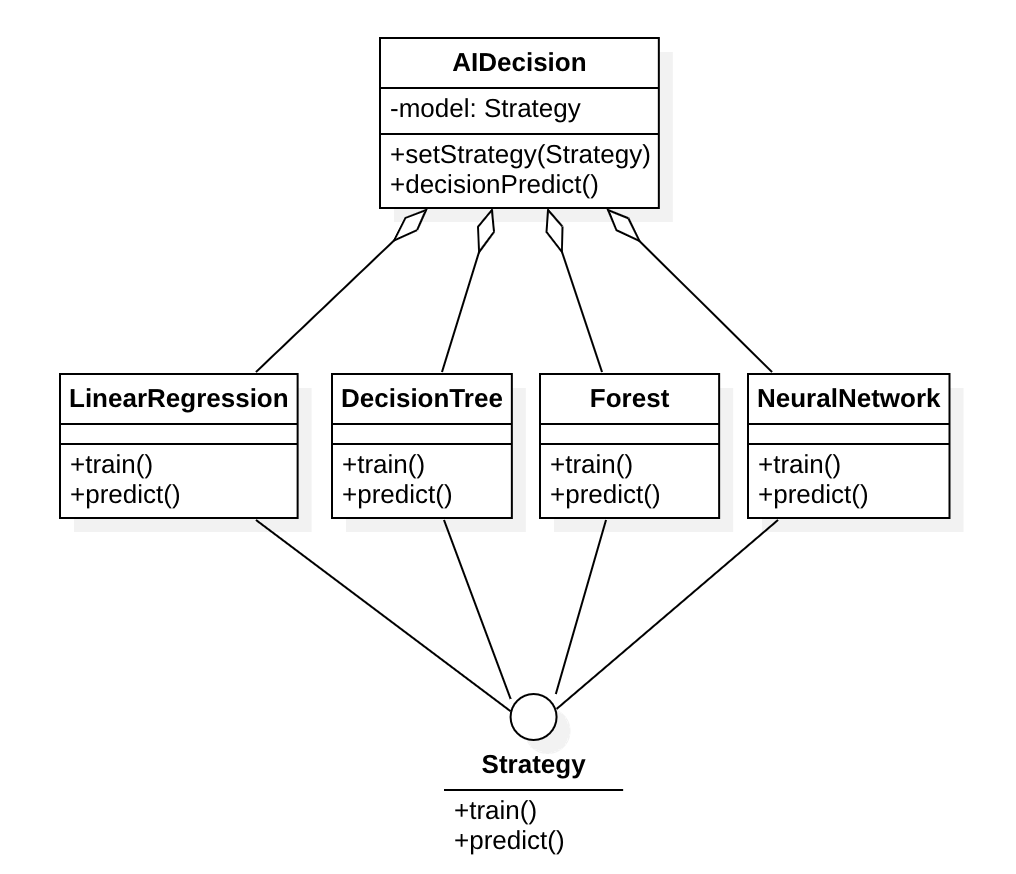
The implementation:
class Strategy {
public:
    void train() = 0;
    void predict() = 0;
};

class LinearRegression : public Strategy {
public:
    void train() {
        // Linear regression training
    }
    void predict() {
        // Linear regression prediction
    }
};

class DecisionTree : public Strategy {
public:
    void train() {
        // Decision tree training
    }
    void predict() {
        // Decision tree prediction
    }
};

class Forest : public Strategy {
public:
    void train() {
        // Random forest training
    }
    void predict() {
        // Random forest prediction
    }
};

class NeuralNetwork : public Strategy {
public:
    void train() {
        // Neural network training
    }
    void predict() {
        // Neural network prediction
    }
};

class AIDecision {
public:
    void setStrategy(Strategy* s) {
        strategy = s;
        scheduleTrain();
    }
    void decisionPredict() {
        strategy->predict();
    }
private:
    Strategy* strategy;
};
A caller uses it like this:
AIDecision ai;

// Predict using the neural network strategy
auto stra = new NeuralNetwork();
ai.setStrategy(stra);
ai.decisionPredict();
Template Method
The Template Method pattern defines the skeleton of an algorithm in a superclass. Subclasses that inherit from it can override specific steps of the algorithm without changing its structure.
For example, in an editor application the basic operations can be designed into a superclass, while subclasses override methods to handle specific file types.
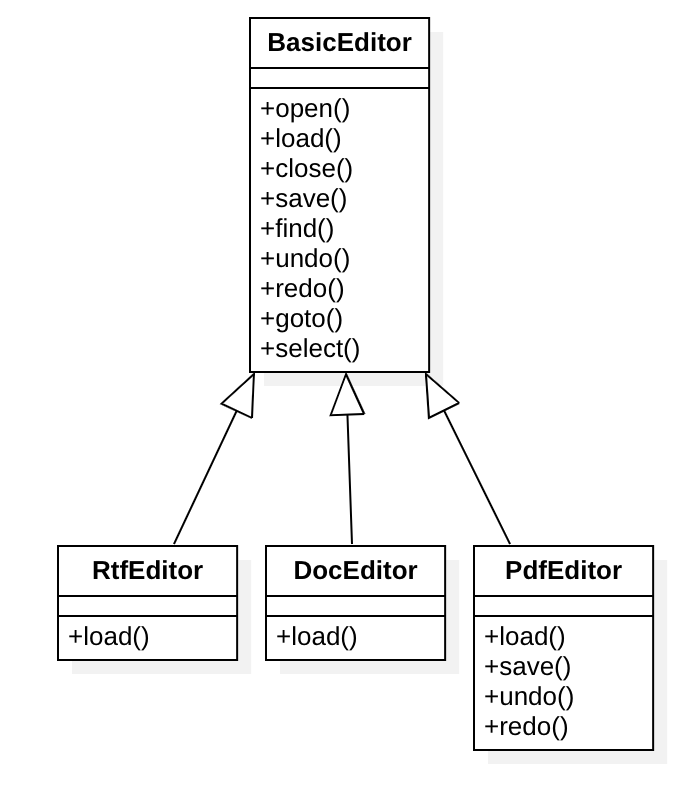
The code:
class BasicEditor {
public:
    void open() {
        // Open file
    }
    void load() {
        // Load file data
    }
    void close() {
        // Close file
    }
    void save() {
        // Save file
    }
    void find() {
        // Search the file
    }
    void undo() {
        // Undo
    }
    void redo() {
        // Redo
    }
    void goto_() {
        // Move the cursor
    }
    void select() {
        // Select text
    }
};

class RtfEditor : public BasicEditor {
public:
    void load() {
        // Load rich-text data
    }
};

class DocEditor : public BasicEditor {
public:
    void load() {
        // Load a Doc document
    }
};

class PdfEditor : public BasicEditor {
public:
    void load() {
        // Load PDF document data
    }
    void save() {
        // Saving is not supported; PDFs are view-only and cannot be modified
    }
    void undo() {
        // Saving is not supported; PDFs are view-only and cannot be modified
    }
    void redo() {
        // Saving is not supported; PDFs are view-only and cannot be modified
    }
};
Visitor
The Visitor pattern separates algorithms from the objects they operate on.
With this approach, the visited objects need no changes, yet their properties can still be accessed.
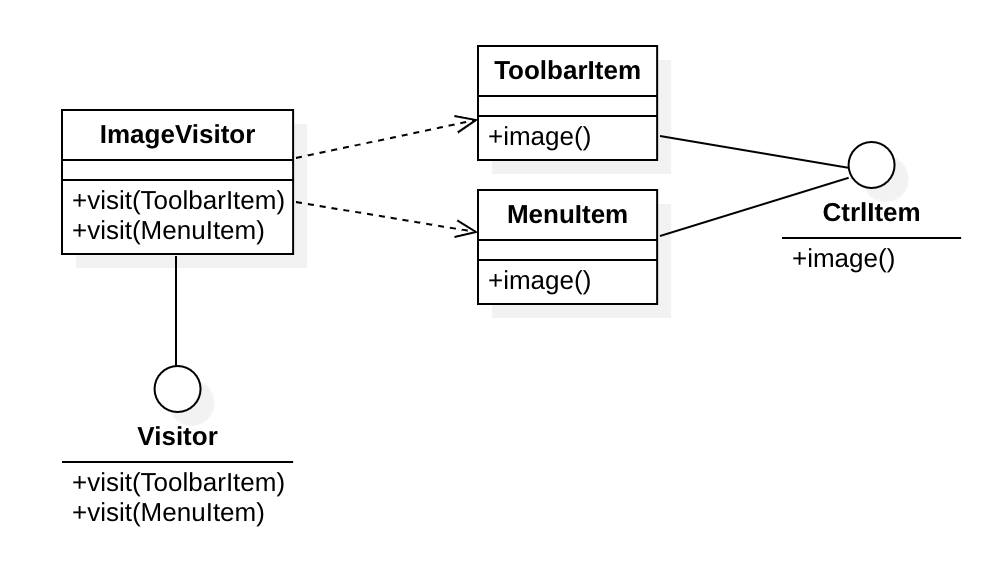
The diagram shows an example that uses the Visitor pattern to fetch icon images from an application's menus and toolbars.
class CtrlItem {
public:
    Image* image() = 0;
};

class ToolbarItem : public CtrlItem {
public:
    Image* image() {
        // Return the icon image
    }
};

class MenuItem : public CtrlItem {
public:
    Image* image() {
        // Return the icon image
    }
};

class Visitor {
public:
    Image* visit(ToolbarItem*) = 0;
    Image* visit(MenuItem*) = 0;
};

class ImageVisitor : public Visitor {
public:
    Image* visit(ToolbarItem* item) {
        return item->image();
    }
    Image* visit(MenuItem* item) {
        return item->image();
    }
};
Using the Visitor pattern:
ToolbarItem* item1 = new ToolbarItem("a.png");
ToolbarItem* item2 = new ToolbarItem("b.png");
MenuItem* item3 = new MenuItem("c.png");

ImageVisitor visitor;
auto image1 = visitor.visit(item1);
auto image2 = visitor.visit(item2);
auto image3 = visitor.visit(item3);